
Key facts
Start here
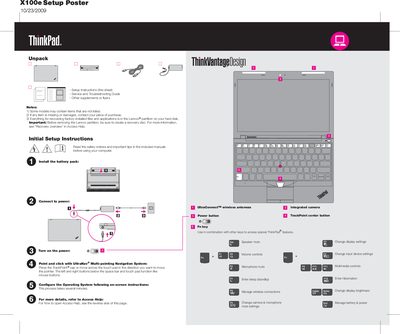
Lenovo ThinkPad X100e Quick Start Guide
This guide provides initial setup instructions for the ThinkPad X100e, including how to connect power, install the battery pack, and use the UltraNav multi‑pointing system. It also points users to the pre‑installed Lenovo Access Help for detailed configuration steps.
Safety tips cover heat generated by the laptop and AC adapter, handling of cables, and advice on creating a recovery disc before modifying the Lenovo partition. Links to the Service and Troubleshooting Guide, Safety and Warranty Guide, and regulatory notices are also included.
Lenovo ThinkPad X100E specifications
| Wireless | UltraConnect™ |
|---|---|
| Camera | Integrated |
| TrackPoint | Center button |
All Lenovo ThinkPad X100E documents by type
Day-to-day operation, settings and troubleshooting. Start here if the product is already set up.
Disassembly, diagnostics and part numbers, for repair.
The shortest path to a working setup, usually only a few pages.
Questions answered in these manuals
Where can I find the safety and warranty guides online?
Visit the Lenovo support website (e.g., http://www.lenovo.com/support) and select the troubleshooting manuals section.
How do I create a recovery disc before removing the Lenovo partition?
Before removing the Lenovo partition, be sure to create a recovery disc.
How can I open Access Help for more detailed instructions?
Click Start, move the pointer to All Programs, then to ThinkVantage, and select Access Help.
What safety precautions should be taken before servicing a ThinkPad notebook?
Technicians should use approved tools, disconnect all power, wear safety glasses, avoid loose clothing, and follow grounding and electrostatic discharge guidelines.
From: Lenovo ThinkPad X100e and X120e Hardware Maintenance Manual
What processor does the Lenovo X100e use?
It uses an AMD Athlon Neo MV40 1.6 GHz single‑core processor with 512 KB L2 cache.
How much RAM can be installed in the X100e?
The notebook comes with 2 GB DDR2 RAM and can be expanded up to 4 GB using two SO‑DIMM slots.