
Key facts
Start here
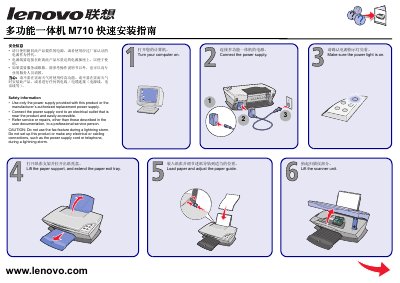
LENOVO multi-function all-in-oneM710 quick installation Service Manual
This guide provides step‑by‑step instructions for powering on the Lenovo M710 all‑in‑one, loading paper, installing print cartridges, and connecting the device to a computer via USB and the supplied software CD. Safety precautions are highlighted, including proper power‑supply use and warnings about operating the fax function during lightning storms.
Follow the on‑screen prompts after connecting the USB cable, and cancel any "Add New Hardware" dialogs that appear. After installation, verify that the power indicator is lit and the scanner unit is closed before beginning regular use. This manual is written in Chinese.
Lenovo M710q specifications
| Power supply | 65 W automatic voltage‑sensing (optional 90 W) |
|---|---|
| Storage drives | Up to two storage drives |
| Physical dimensions | Width 35 mm, Height 183 mm, Depth 179 mm |
| Weight (maximum configuration) | 1.3 kg (2.9 lb) |
| Network features | Ethernet LAN, optional Wireless LAN and Bluetooth |
Source: Lenovo M710q User Guide and Hardware Maintenance Manual
All Lenovo M710q documents by type
Day-to-day operation, settings and troubleshooting. Start here if the product is already set up.
The shortest path to a working setup, usually only a few pages.
Questions answered in these manuals
How do you attach a Kensington‑style cable lock?
Connect the lock to the security‑lock slot at the rear of the computer; the lock can be keyed or combination and also secures the cover buttons.
From: Lenovo M710q User Guide and Hardware Maintenance Manual
What is the maximum current rating of the I/O box?
The I/O box supports a maximum current rating of 5 A, with USB 2.0 ports delivering 500 mA and USB 3.0 ports delivering 900 mA.
From: Lenovo M710q User Guide and Hardware Maintenance Manual
What power supply should I use with the M710?
Use only the power supply that came with the product or an authorized replacement, and plug it into a nearby accessible outlet.
From: LENOVO multi-function all-in-oneM710 quick installation Service Manual
Can I use the fax feature during a lightning storm?
No. Do not use the fax function or make any electrical connections during a lightning storm.
From: LENOVO multi-function all-in-oneM710 quick installation Service Manual