
This is Lenovo device's initial setup instructions
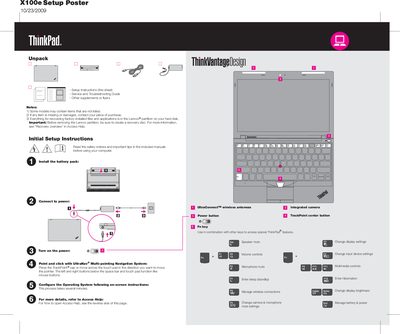
This guide provides initial setup instructions for the ThinkPad X100e, including how to connect power, install the battery pack, and use the UltraNav multi‑pointing system. It also points users to the pre‑installed Lenovo Access Help for detailed configuration steps.
Safety tips cover heat generated by the laptop and AC adapter, handling of cables, and advice on creating a recovery disc before modifying the Lenovo partition. Links to the Service and Troubleshooting Guide, Safety and Warranty Guide, and regulatory notices are also included.
| Wireless | UltraConnect™ |
|---|---|
| Camera | Integrated |
| TrackPoint | Center button |
Before removing the Lenovo partition, be sure to create a recovery disc.
Click Start, move the pointer to All Programs, then to ThinkVantage, and select Access Help.