
This document describes the features and characteristics of the Lenovo ThinkPad (X100e series) notebook computer, including the use of AMD platform architecture and AMD processors, ISO full-size keyboard, built-in dual pointing interface and TouchPad, etc.
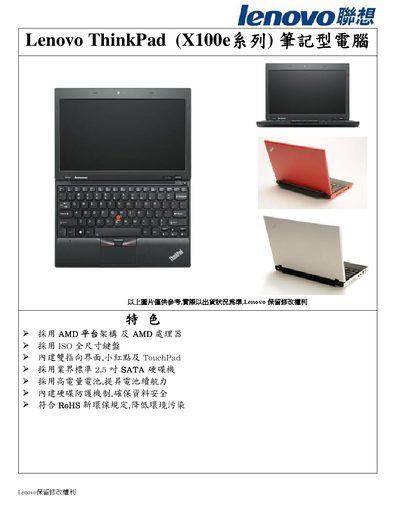
This manual introduces the Lenovo X100e notebook, an 11.6‑inch laptop built on the AMD platform with a full‑size ISO keyboard, TouchPad, and integrated TrackPoint. It outlines the device’s design, warranty, and safety information.
Key hardware details include an AMD Athlon Neo MV40 1.6 GHz processor, up to 4 GB DDR2 RAM, a 320 GB 5400 rpm SATA‑150 hard drive with ThinkVantage Active Protection, ATI Radeon 3200 graphics, and a 6‑cell battery offering around five hours of use. Connectivity options comprise Wi‑Fi 802.11b/g/n, three USB 2.0 ports, RJ45, and a VGA output. This manual is written in Chinese.
| Processor | AMD Athlon Neo MV40 1.6 GHz, single‑core, 512 KB L2 cache |
|---|---|
| Memory | 2 GB DDR2 (max 4 GB, 667 MHz) |
| Storage | 320 GB 5400 rpm 2.5" SATA‑150 HDD |
| Graphics | ATI Radeon 3200 with up to 512 MB shared memory |
| Display | 11.6" HD (1366×768) LED‑backlit panel |
| Battery | 6‑cell Li‑ion, approx. 5 hours runtime |
| Wireless | 802.11b/g/n built‑in |
| Ports | 3×USB 2.0 (one powered off), RJ45, VGA, audio jacks |
| Operating System | Windows 7 Home Premium 32‑bit |
It uses an AMD Athlon Neo MV40 1.6 GHz single‑core processor with 512 KB L2 cache.
The notebook comes with 2 GB DDR2 RAM and can be expanded up to 4 GB using two SO‑DIMM slots.
The standard 6‑cell lithium battery provides about five hours of operation.
Yes, it includes the ThinkVantage Active Protection System to protect the hard drive from shocks.