
XPS 12 Quick Start Guide
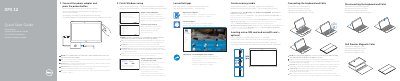
The Dell XPS 12 9250 Quick Start Guide provides essential instructions for setting up the device, including connecting power, completing Windows setup, and registering the computer through Dell SupportAssist.
It details the hardware layout of the tablet, including port locations and camera placement, and provides instructions for connecting and disconnecting the keyboard and Dell Premier Magnetic Folio.
| Ports | 2 Thunderbolt 3 ports (USB-C)/ charging ports |
|---|---|
| Card Slots | MicroSD card slot and Micro-SIM card slot |
The keyboard backlight will turn on for 2 seconds when the tablet and keyboard docking pins are aligned correctly.
It is recommended to insert these cards before powering on the tablet.