
Key facts
Start here
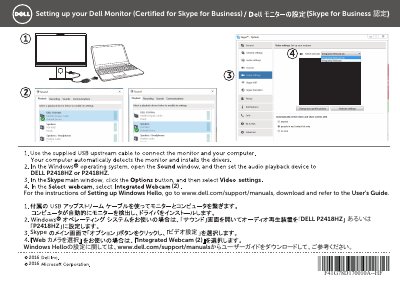
Dell P2418HZ Monitor Skype for Business Setup Guide
This two-page setup sheet from Dell explains how to set up the P2418HZ monitor, which is certified for Skype for Business. It shows which video input device to choose in Skype and points readers to the online user guide for Windows Hello setup.
The instructions are given in Japanese and Chinese on facing pages, with an English heading reading "Setting up your Dell Monitor (Certified for Skype for Business)". For Windows Hello configuration, the sheet directs users to www.dell.com/support/manuals to download the User's Guide. This manual is written in Japanese.
Dell P2418HZ specifications
| Viewable image diagonal | 604.70 mm (23.80 in) |
|---|---|
| Horizontal active area | 527.04 mm (20.75 in) |
| Vertical active area | 296.46 mm (11.67 in) |
| Pixel pitch | 0.2745 mm x 0.2745 mm |
| Pixel density | 93 PPI |
| Brightness | 250 cd/m² (typical) |
| Contrast ratio | 1000: 1 (typical) |
| Dynamic contrast ratio | 8 Million: 1 (Dynamic) |
| Aspect ratio | 16:9 |
| Response time | 6 ms (gray to gray) |
| Color depth | 16.7 million colors |
| Color support | 83% (CIE 1976), 72% (CIE 1931) |
| Backlight | White LED edgelight system |
| Display coating | Anti-glare with 3H hardness |
| Vertical viewing angle | 178° typical |
| Horizontal viewing angle | 178° typical |
| Horizontal scan range | 30 kHz to 83 kHz (automatic) |
| Vertical scan range | 56 Hz to 76 Hz (automatic) |
| Maximum preset resolution | 1920 x 1080 at 60 Hz |
| AC input voltage | 100 VAC to 240 VAC |
| AC input frequency | 50 Hz or 60 Hz ± 3 Hz |
| Sleep mode power consumption | 0.3 W |
| USB hub | USB 3.0 super-speed hub |
| Webcam lens field of view | 77.5° |
| Webcam focus mode | Fixed Focus |
| Webcam image sensor | 2.12 mega-pixel |
| Webcam video frame rate | up to 30 frames per second |
| VESA mounting | 100 mm x 100 mm |
| Inrush current at 120 V | 30 A (Max.) at 0°C (cold start) |
| Inrush current at 240 V | 60 A (Max.) at 0°C (cold start) |
Source: Dell P2418HZ Monitor User Guide
All Dell P2418HZ documents by type
The shortest path to a working setup, usually only a few pages.
Day-to-day operation, settings and troubleshooting. Start here if the product is already set up.
Questions answered in these manuals
Which video input device should I select in Skype?
In the video input device selection, choose "Integrated Webcam (2)".
Where do I find instructions for setting up Windows Hello?
Go to www.dell.com/support/manuals, download the User's Guide and refer to it.
What monitor does this Drivers and Documentation package support?
It supports the Dell P2418HZ Monitor.
What items are included in this package?
Device drivers, Quick Setup Guide, User's Guide, and Dell Display Manager Software.
What is the maximum preset resolution of the Dell P2418HZ?
The maximum preset resolution is 1920 x 1080 at 60 Hz.
How much power does the monitor use in sleep mode?
The monitor uses 0.3 W in sleep mode.