
Key facts
- Brand
- DELL
- Model
- WD19TB
- Category
- Other Computer Accessories
- Documents
- 3
- Languages
- ZH · EN
- Last added
- 2026-10-24
Start here
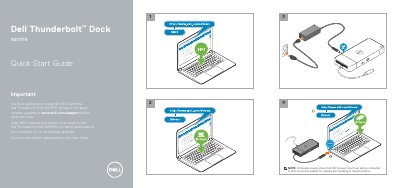
Dell Thunderbolt Dock WD19TB Quick Start Guide
This document is a Quick Start Guide for the Dell Thunderbolt Dock WD19TB. It highlights critical pre-use requirements, specifically the need to update the computer's BIOS and the Dock's drivers to the latest versions available on the Dell support website to ensure proper recognition and optimal functionality. It also notes that computers requiring more than 130 W of power input must be connected to their own power adapter. This manual is written in Chinese.
Read onlineDell WD19TB specifications
| Power Adapter Included (WD19S 130W) | 130 W |
|---|---|
| Power Adapter Included (WD19S 180W) | 180 W |
| Power Adapter Included (WD19TBS) | 180 W |
| Power Adapter Included (WD19DCS) | 240 W |
| Power Adapter Included (D6000S) | 130 W |
| Max Power Delivery (WD19DCS Dual Port) | 210 W |
| Max Power Delivery (WD19DCS Single Port) | 130 W |
| Max Power Delivery (D6000S) | 65 W |
Source: Dell WD19S/WD19TBS/WD19DCS/D6000S Commercial Docking Stations Product Leaflet
All Dell WD19TB documents by type
The shortest path to a working setup, usually only a few pages.
Day-to-day operation, settings and troubleshooting. Start here if the product is already set up.
Questions answered in these manuals
Is the WD19TBS dock compatible with Mac devices?
Yes, the WD19TBS dock is Apple® certified and can be used with Mac devices.
From: Dell WD19S/WD19TBS/WD19DCS/D6000S Commercial Docking Stations Product Leaflet
Can I upgrade the WD19S dock to support Thunderbolt?
Yes, you can upgrade the WD19S to the WD19TBS by replacing the docking module.
From: Dell WD19S/WD19TBS/WD19DCS/D6000S Commercial Docking Stations Product Leaflet
Do I need to update my computer's BIOS before using the Dock?
Yes, you must update your computer's BIOS and the Dell Thunderbolt Dock WD19TB drivers to the latest versions available at www.dell.com/support before using the Dock.
What happens if I use an older BIOS version?
Older BIOS versions and drivers could result in the Dell Thunderbolt Dock WD19TB not being recognized by your computer or not functioning optimally.
Which operating systems support WD19TBS firmware updates?
Windows, Linux, and Chrome operating systems are supported.
Which command-line option runs the update silently?
Use the /s option to run the update in silent mode.