
Key facts
- Brand
- DELL
- Model
- 1KAIO-01
- Category
- Other Computer Accessories
- Documents
- 3
- Languages
- EN
- Last added
- 2023-11-24
Start here
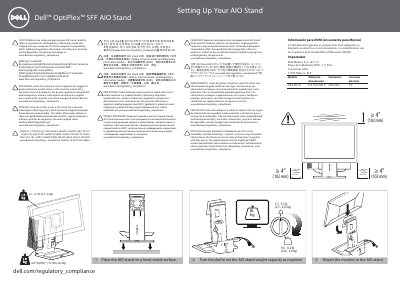
Dell 1KAIO-01 AIO Stand Setup and Safety Guide
This document provides setup instructions for the Dell 1KAIO-01 All-in-One (AIO) stand. It details the steps to place the stand on a stable surface, adjust the weight capacity dial, attach the monitor, and secure the computer chassis. The guide also covers cable management, including routing cables through the front slot and using the cable cover.
Read onlineDell 1KAIO-01 specifications
| Weight Capacity Range | 5.5 - 13.2 lbs (2.5 - 6.0 kg) |
|---|---|
| Input Voltage | 100-240 V |
| Frequency | 50/60 Hz |
All Dell 1KAIO-01 documents by type
Day-to-day operation, settings and troubleshooting. Start here if the product is already set up.
Mounting, wiring and first power-up. Read it before the hardware goes in.
Questions answered in these manuals
What should I read before setting up the AIO stand?
You must read the Safety, Environmental, and Regulatory Information Guide that shipped with your computer.
Where can I find additional EMC information?
Additional regulatory information and safety best practices for Electromagnetic Compatibility (EMC) are available at www.dell.com/regulatory_compliance.
What weight range does the Dell OptiPlex SFF AIO Stand support?
The stand supports systems weighing 5.5 to 13.2 lb (2.5 to 6.0 kg).
What is the maximum weight for a Dell OptiPlex system on this stand?
Dell OptiPlex systems must weigh no more than 13.75 lb (6.24 kg).
How do I adjust the weight capacity of the stand?
Turn the dial to set the AIO stand weight capacity as required.
Where should I route the cables?
Connect the cables to the monitor and route them through the front slot.