
The document is a user guide for Philips mobile phone TFT display screen. It describes the operation of the phone's function keys, explains the icons and symbols displayed on the screen, and provides information about the phone's basic functions and multimedia applications.
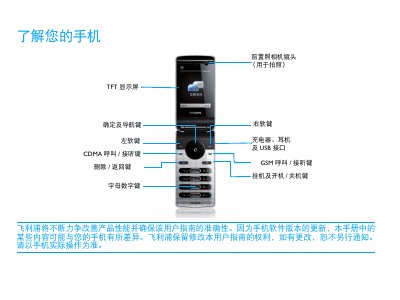
This guide explains how to operate the Philips phone, including dual‑mode GSM and CDMA calling, sending SMS, and using the device in standby mode. It provides step‑by‑step instructions for installing the UIM/SIM card, charging the battery, inserting a micro‑SD card, and connecting via USB for data transfer.
The manual also contains safety and environmental notes, such as temperature limits, Bluetooth usage, and regulatory compliance (EN 60950, RoHS). It warns about proper handling of the device in extreme temperatures and outlines disposal and hazardous material information. This manual is written in Chinese.
When first using the phone, open the SIM/UIM slot, insert the UIM/SIM card as shown, and close the slot before powering on the device.