
This manual introduces the basic operation of the Philips phone, including buttons, quick icons, status bar, basic operations and icons and symbols.
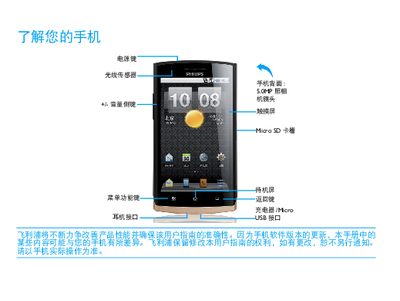
This guide introduces the main functions of the Philips Y920 phone, including navigation of the standby screen, status bar icons, quick‑menu shortcuts, and how to use the power, home and back keys. It also describes how to manage contacts, messages, calls and multimedia applications.
The manual provides step‑by‑step instructions for installing the SIM/USIM card, charging the battery via the Micro‑USB port, enabling Bluetooth and Wi‑Fi, and offers safety tips, battery‑saving recommendations and troubleshooting advice for common issues such as network loss, SIM errors and charging problems. This manual is written in Chinese.
| Charging port | Micro USB |
|---|---|
| Bluetooth | Enabled |
| SAR value | 0.422 W/kg |