
This manual introduces the basic operation methods of Philips mobile phone, including the phone's standby screen, buttons, icons, status bar and basic operations.
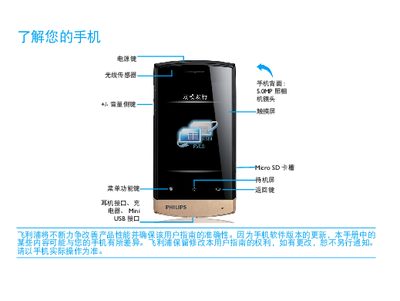
This guide covers the basic operation of the Philips D822 mobile phone, including the standby screen, key functions, quick‑menu shortcuts, and how to navigate the interface. Detailed steps are provided for installing the SIM/RUIM card, charging the battery, and using connectivity features such as Bluetooth and Wi‑Fi.
The manual also includes safety and precautionary information, battery‑care tips, troubleshooting procedures for common issues like network loss or screen problems, and regulatory compliance details such as SAR limits and RoHS compliance. This manual is written in Chinese.
| SAR (Specific Absorption Rate) | 0.382 W/kg |
|---|
Remove and reinstall the battery, then charge it until the battery indicator stops flashing.