
This document is a user guide for Philips mobile phones. It mainly introduces the basic operations and functions of mobile phones.
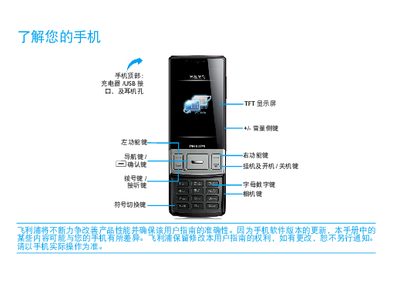
This guide explains the basic operation of the Xenium W625 mobile phone, including the function of each key, how to navigate the standby screen, unlock the display, and use the touch screen. It also describes the icons that indicate network status, battery level, Bluetooth, and other functions.
The manual covers installation steps such as inserting the USIM/SIM card, inserting a Micro‑SD card, charging the device via the Mini‑USB connector, and synchronizing data with a computer. It includes safety notes, battery‑care tips, and troubleshooting advice for common issues like no network signal, battery not charging, or screen responsiveness problems. This manual is written in Chinese.
| SAR (Specific Absorption Rate) | 0.269 瓦特 |
|---|---|
| Supported networks | GSM, EDGE, GPRS |
| Charging interface | Mini USB |
Turn off the phone, remove the battery cover, take out the battery, then insert the USIM or SIM card into the slot and replace the battery cover.
Connect the charger to the Mini‑USB port; once the battery is fully charged you may disconnect the charger without harming the battery.
Keep the battery sufficiently charged, reduce screen brightness, disable unnecessary auto‑sync features, and avoid using the phone in extreme temperatures.