
This document is the user manual of a Philips phone, which introduces the basic functions and usage methods of the phone.
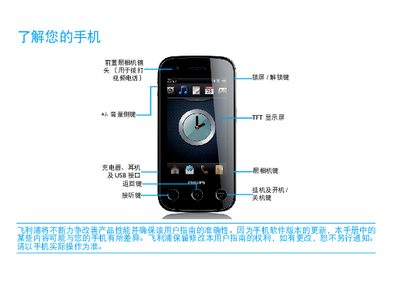
This guide explains the basic operation of the Philips D813 phone, including the layout of the standby screen, key functions, and how to install the UIM/SIM card, insert a Micro SD card, and charge the battery. It also covers personalization options such as display settings, ringtone selection, and USB data synchronization with a computer.
Additional sections address network connectivity for GSM and CDMA networks, battery‑care tips, safety warnings, and common troubleshooting steps for issues like no network signal, charging problems, and poor camera performance. This manual is written in Chinese.
Turn off the phone, press the battery cover button, remove the cover, insert the UIM/SIM card, then replace the cover.
Connect the charger and wait a few minutes (usually no more than 5) before the battery icon appears.
Keep the battery sufficiently charged, reduce screen brightness, and disable unnecessary auto‑sync or vibration features.
The status bar will show an indicator that the phone has connected to the GSM network.