
Philips mobile phone user guide, introduces the functions of the phone's function keys, standby screen, stylus, desktop widget, main menu, icons and symbols
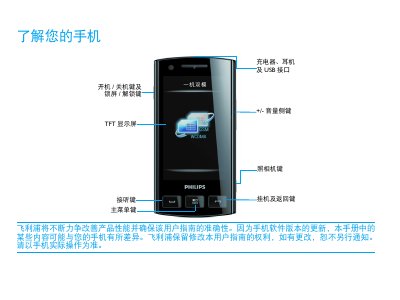
This guide walks you through the main functions of the Philips WW725 phone, including how to power on/off, use the touchscreen, navigate the home screen, and operate built‑in apps such as the camera, calendar, calculator and Bluetooth. Detailed instructions are provided for inserting the SIM card, charging the battery, and calibrating the display.
Safety and regulatory information is also covered, with notes on SAR limits, RoHS compliance, and troubleshooting tips for network, battery and display issues. The manual includes a quick reference to supported network technologies (GPRS, EDGE, WCDMA, HSDPA) and advice on extending battery life. This manual is written in Chinese.
| Maximum SAR | 603 W/kg |
|---|---|
| Supported Network | GPRS, EDGE, WCDMA, HSDPA |
| Supported Network | EDGE |
| Supported Network | WCDMA |
| Supported Network | HSDPA |
Turn off the phone, remove the battery cover, take out the battery, insert the SIM card, replace the battery and then connect the charger.
Follow the on‑screen prompts or go to Settings → General → Screen Calibration to adjust the touch input.