
Yamaha V922820 Quick Operation Guide

This is an electronic piano user manual, including volume, metronome, sound, etc.
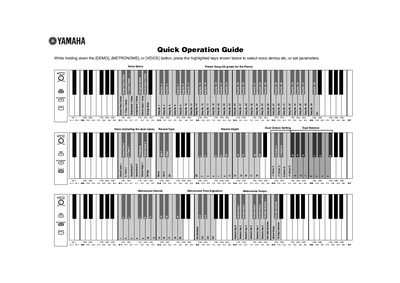

Yamaha V922820 Quick Operation Guide - cover page
Brand
Yamaha
Category
Musical instruments
Document type
User Manual
Language
English
Pages
2
File format
PDF
File size
81 KB
Published
11 June, 2012
Updated
30 September, 2023
Model
V922820
MD5 checksum
224123218D29403C804CF192E0E677CF

About this manual

This Quick Operation Guide provides instructions for the Yamaha V922820 digital musical instrument. It details how to select voice demos, including a preset song for the piano, and how to adjust various parameters while holding down specific keys.

What's inside

  • Voice Demo Preset Song
  • Metronome Settings
  • Reverb Settings
  • Tune Up
  • Standard Pitch
  • Program Change
  • MIDI Transmit Channel
  • MIDI Receive Channel

Specifications

Standard Pitch440.0 Hz
Tune Up Stepabout 0.2Hz steps

Frequently asked questions

How do I select a voice demo preset song?

While holding down the [DEMO], [METRONOME], or [VOICE] button, press the highlighted keys to select the voice demo.

What is the standard pitch setting?

The standard pitch is set to 440.0 Hz.

Download PDF (81 KB)

More Yamaha Manuals


View all Yamaha manuals →