
This document is a user manual for electronic keyboards, introducing the usage methods, functions and features of electronic keyboards
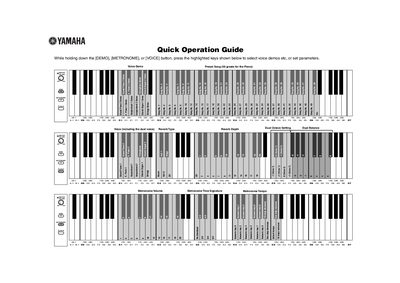
This document serves as a Quick Operation Guide for the Yamaha V922820 digital musical instrument. It provides instructions on how to select voice demos and preset songs by holding down specific buttons like [DEMO], [METRONOME], or [VOICE] and pressing highlighted keys. The guide also explains how to set various parameters for these functions.
| Standard pitch | 440.0 Hz |
|---|---|
| Tune Up step | about 0.2Hz steps |
While holding down the [DEMO], [METRONOME], or [VOICE] button, press the highlighted keys shown below to select voice demos etc.
The standard pitch is set to 440.0 Hz.