
Key facts
- Brand
- Yamaha
- Model
- NP-11
- Category
- Home Speakers
- Industry
- Computers
- Documents
- 4
- Languages
- EN
- Last added
- 2012-06-11
Start here
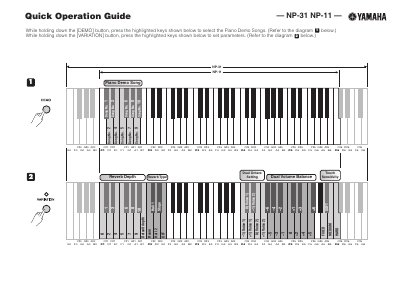
Yamaha NP-31/NP-11 Quick Operation Guide
This document serves as a Quick Operation Guide for the Yamaha NP-31 and NP-11 digital musical instruments. It provides step-by-step instructions for selecting piano demo songs and setting variation parameters by using specific button combinations.
Read onlineYamaha NP-11 specifications
| Supported Models | NP-31, NP-11 |
|---|---|
| Note Number Range (Transmit) | A-2 to C8 |
| Note Number Range (Receive) | C-2 to G8 |
| Main Volume Control | Controller 07H |
| Sustain Pedal Control | Controller 40H |
All Yamaha NP-11 documents by type
Day-to-day operation, settings and troubleshooting. Start here if the product is already set up.
The shortest path to a working setup, usually only a few pages.
Questions answered in these manuals
How do I select the Piano Demo Songs?
Hold down the [DEMO] button and press the highlighted keys shown in the diagram.
How do I set parameters for the Metronome?
Hold down the [METRONOME ON/OFF] button and press the highlighted keys shown in the diagram.
What is included with the instrument?
The package includes an Owner's Manual, a Quick Operation Guide, and a Music Rest.
Can I use extension cords with this product?
The use of an extension cord is not recommended; if necessary, the minimum wire size for a 25' cord or less is 18 AWG.
How do I set the MIDI transmit channel?
While holding down the [DEMO] button, press and hold the [METRONOME ON/OFF] button, then press one of the C1—E2 keys.
How do I set the MIDI receive channel?
While holding down the [DEMO] button, press and hold the [METRONOME ON/OFF] button, then press one of the C4-F5 keys.