
Yamaha NP-31/NP-11 Quick Operation Guide

This file is a user manual for NP-31 and NP-11, introducing the features and usage of these products

Yamaha NP-31/NP-11 Quick Operation Guide - cover page
Brand
Yamaha
Category
Digital
Document type
Quick Start Guide
Language
English
Pages
2
File format
PDF
File size
1.3 MB
Published
11 June, 2012
Updated
30 September, 2023
Models
NP-31, NP-11
MD5 checksum
BF7C35ED9F8D6CA2956641E4319E7A2A

About this manual

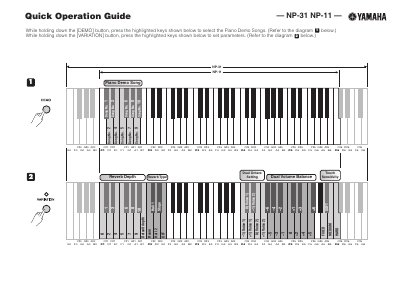
This document serves as a Quick Operation Guide for the Yamaha NP-31 and NP-11 digital musical instruments. It provides step-by-step instructions for selecting piano demo songs and setting variation parameters by using specific button combinations.

What's inside

  • Piano Demo Songs
  • Variation Settings
  • Metronome Parameters
  • Auto Program
  • Power Off Change
  • Local Control
  • Control Change
  • MIDI Transmit Channel
  • Transpose
  • Tuning

Frequently asked questions

How do I select the Piano Demo Songs?

Hold down the [DEMO] button and press the highlighted keys shown in the diagram.

How do I set parameters for the Metronome?

Hold down the [METRONOME ON/OFF] button and press the highlighted keys shown in the diagram.

How do I set parameters for Demo Song Tempo?

Hold down the [DEMO] button and hold the [METRONOME ON/OFF] button while pressing the highlighted keys.

Download PDF (1.3 MB)

More Yamaha Manuals


View all Yamaha manuals →