
Key facts
Start here
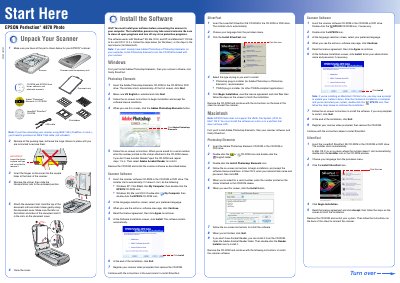
EPSON Perfection 4870 Photo Scanner User Manual
This document serves as a user guide for the EPSON Perfection 4870 Photo scanner. It details the initial setup process, including verifying that all parts are present and correctly assembling the scanner hardware by attaching the document mat and cover. The guide emphasizes the requirement to install software before connecting the device to a computer.
Read onlineEpson Perfection 4870 specifications
| Scanner type | Flatbed, color |
|---|---|
| Scanner type | Photoelectric device |
| Optical resolution | 4800 dpi |
| Maximum interpolated resolution | 12,800 dpi |
| Output resolution | 25 to 12,800 dpi |
| Pixel depth | 16 bits per pixel |
| Light source | White cold cathode fluorescent lamp |
| Reliability (MCBF) | 36,000 cycles |
| Dimensions (Width) | 12.0 inches (30.4 cm) |
| Weight | Approx. 14.8 Ib (6.7 kg) |
| Input voltage | 100-120 VAC + 10% |
| Interface | USB 1.1/2.0, IEEE 1394 |
Source: Epson Perfection 4870 Series Scanner Specifications and Quick Guide
All Epson Perfection 4870 documents by type
Day-to-day operation, settings and troubleshooting. Start here if the product is already set up.
Questions answered in these manuals
What operating systems are supported by this scanner software?
The software works with Windows 98, Me, 2000, and XP, and Macintosh OS 8.6 to 9.x and OS X 10.2.x.
Is an IEEE 1394 cable included with the scanner?
No, if you plan to connect using IEEE 1394 (FireWire or iLink), you must purchase the cable separately.
What is the optical resolution of the Epson Perfection 4870?
The optical resolution is 4800 dpi.
From: Epson Perfection 4870 Series Scanner Specifications and Quick Guide
What is the maximum interpolated resolution?
The maximum interpolated resolution is 12,800 dpi.
From: Epson Perfection 4870 Series Scanner Specifications and Quick Guide