
Key facts
Start here
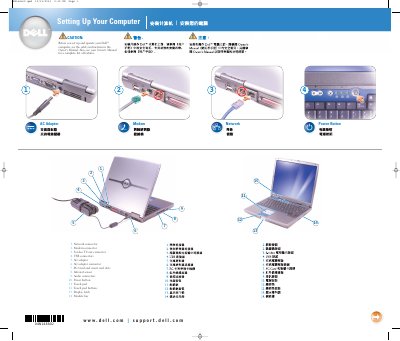
Dell Inspiron 6400 Laptop Setting Up Your Computer Guide
This is Dell's short "Setting Up Your Computer" guide for the Inspiron 6400 laptop, printed in October 2003 (document 4N148). The first page labels the computer's connectors and controls, including the network and modem connectors, S-video TV-out connector, USB connectors, AC adapter connector, PC Card and smart card slots, infrared sensor, audio connectors, power button, touch pad, display latch, and module bay.
The second page gives brief instructions for finding answers in the Owner's Manual and the Dell Tell Me How help file, removing a battery from the battery bay, and connecting to a wireless network in Microsoft Windows. It directs users to the Owner's Manual for safety instructions and a complete list of features.
Dell Inspiron 6400 specifications
| Processor type | Intel Core Duo, Core Solo, or Celeron M |
|---|---|
| Level 1 cache | 32 KB |
| Level 2 cache | 1 MB or 2 MB |
| External bus frequency | 533 MHz and 667 MHz |
| System chipset | Intel 945 GM or Intel 945 PM |
| Data bus width | 64 bit |
| ExpressCard slot | One ExpressCard slot (54 mm) |
| Supported cards | ExpressCard/34 and ExpressCard/54 |
All Dell Inspiron 6400 documents by type
The shortest path to a working setup, usually only a few pages.
Day-to-day operation, settings and troubleshooting. Start here if the product is already set up.
Questions answered in these manuals
How do I remove the battery from a Dell Inspiron 6400?
Slide and lift the latch release on the bottom of the computer to remove the battery.
From: Dell Inspiron 6400 Laptop Setting Up Your Computer Guide
How do I open the Dell Tell Me How help file?
Click the Start button and click Help and Support, click User and system guides, then click User's guides and click Tell Me How.
From: Dell Inspiron 6400 Laptop Setting Up Your Computer Guide
What is the Dell Inspiron 6400/E1505?
It is a computer model designated as PP20L.
What does a NOTE indicate in this manual?
It indicates important information that will help you make better use of the equipment.
What is the model number?
The model number is PP20L.
Is ExpressCard a boot device?
No, ExpressCard is not a boot device.