
Key facts
Start here
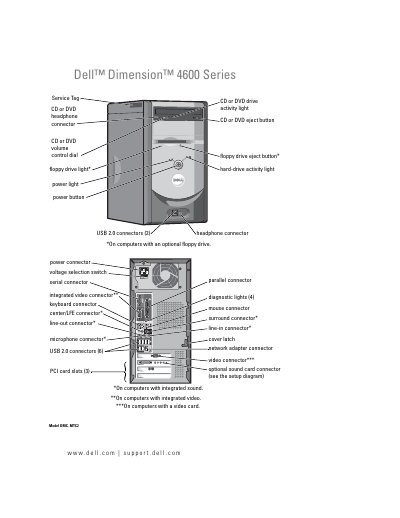
Dell Dimension 4600 Series Desktop Computer User Manual
This user manual covers the Dell Dimension 4600 Series desktop computer, including models DMC and MTC2. It describes front and back panel components, connectors, indicator lights, and the voltage selection switch.
The guide includes setup steps for printers, networks, and Internet connections, plus troubleshooting, memory and drive installation, system setup, and technical specifications.
Dell Dimension 4600 Series specifications
| Microprocessor type | Intel Pentium 4 |
|---|---|
| L1 cache | 8 KB |
| L2 cache | 512-KB or 1-MB |
| System chip set | Intel 865PE or 865G |
| PCI bus speed | 33 MHz |
| PCI connectors | 3 |
| AGP | 1X, 4X, 8X |
Source: Dell Dimension 4600 Series Desktop Computer User Manual
All Dell Dimension 4600 Series documents by type
Day-to-day operation, settings and troubleshooting. Start here if the product is already set up.
Questions answered in these manuals
Where are the Express Service Code and Service Tag located?
These labels are located on your computer.
From: Dell Dimension 4600 Series Desktop Computer User Manual
What does a NOTE indicate?
It indicates important information that helps you make better use of your computer.
From: Dell Dimension 4600 Series Desktop Computer User Manual