
Key facts
Start here
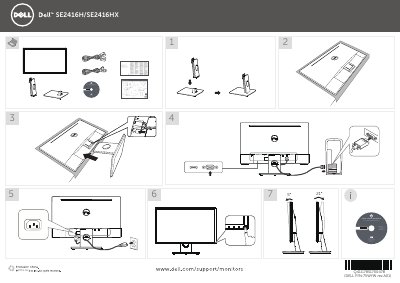
Dell SE2416H/SE2416HX Monitor Quick Setup Guide
This is the printed sleeve for the Dell SE2416H/SE2416HX Monitor drivers and documentation media. It lists the contents supplied on the disc: device drivers, a Quick Setup Guide, a User's Guide and the Dell Display Manager Software, and it shows the monitor's tilt positions.
The sleeve carries the Dell copyright notice for 2015-16, the disc part numbers P/N J55PM Rev. A01 and P/N Q70G24C170008A, a January 2016 date and the marking Made in China. The source is a single printed page, so only this identification and contents information is available.
Dell SE2416H/SE2416HX specifications
| Screen size | 604.70 mm (23.81 in) |
|---|---|
| Panel type | In-Plane Switching |
| Maximum resolution | 1920 x 1080 at 60 Hz |
| Contrast ratio | 1000 to 1 (typical) |
| Luminance output | 250 cd/m² (typical) |
| Response time | 6 ms typical (G to G) |
| AC input voltage | 100 VAC to 240 VAC |
| Weight with stand | 4.30 kg (9.48 lb) |
All Dell SE2416H/SE2416HX documents by type
Day-to-day operation, settings and troubleshooting. Start here if the product is already set up.
The shortest path to a working setup, usually only a few pages.
Questions answered in these manuals
What cable connects the monitor to the computer's HDMI port?
Use an HDMI cable to connect your computer to the monitor.
What is the maximum preset resolution?
The maximum preset resolution is 1920 x 1080 at 60 Hz.
What is included on the Dell SE2416H/SE2416HX drivers and documentation disc?
The disc contains device drivers, the Quick Setup Guide, the User's Guide and the Dell Display Manager Software.
Which monitor models does this documentation cover?
It covers the Dell SE2416H and SE2416HX monitors.
What resolution does the Dell SE2416H/SE2416HX support?
The monitor has a resolution of 1920 x 1080 and supports full-screen display for lower resolutions.
Which video inputs does the monitor have?
It has VGA and HDMI connectivity for connecting to a computer.