
This is a quick setup guide for Canon MFC-790CW, it includes instructions for product installation and usage.
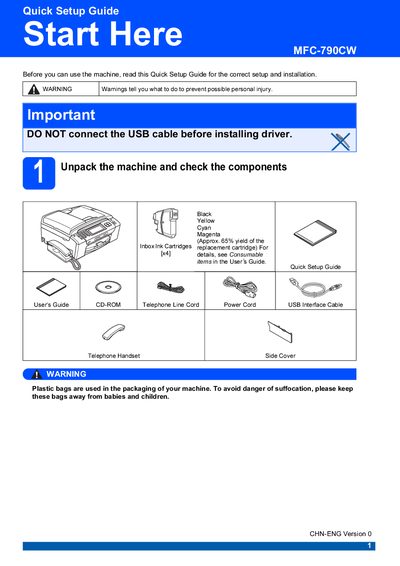
The guide starts with unpacking the machine, removing protective tape, and connecting the power cord, telephone line, and supplied USB cable. It also explains how to set up a network connection using a Category 5 (or greater) straight‑through cable and warns about grounding requirements.
Next, it covers loading plain A4 paper, installing the four ink cartridges (LC990 series), running the initial cleaning cycle, and performing a print‑quality check. The guide finishes with instructions for choosing a receive mode, restoring network settings to factory defaults, and replacing consumables.
| Ink cartridge models | LC990BK (Black), LC990Y (Yellow), LC990C (Cyan), LC990M (Magenta) |
|---|---|
| USB cable type and length | USB 2.0 Type A/B, max 2 m |
| Power cord requirement | Standard earthed power outlet |
| Paper size supported | Plain A4 |
| Receive mode options | Fax Only, Fax/Tel, Manual |
No. The guide states not to connect the USB cable before installing the driver.
Turn off the machine, disconnect all cables except power, press MENU → Network → Factory Reset, confirm with Yes and hold for 2 seconds.
Open the ink cartridge cover, match the cartridge color with the lever, insert each cartridge until it clicks, then close the cover.
After the cleaning cycle, the LCD asks if the print quality is OK; press Yes if the four color blocks are clear.