
Quickstart guide for the Nikon D5100 covering basic camera handling, focusing, zooming, shooting, and photo playback.
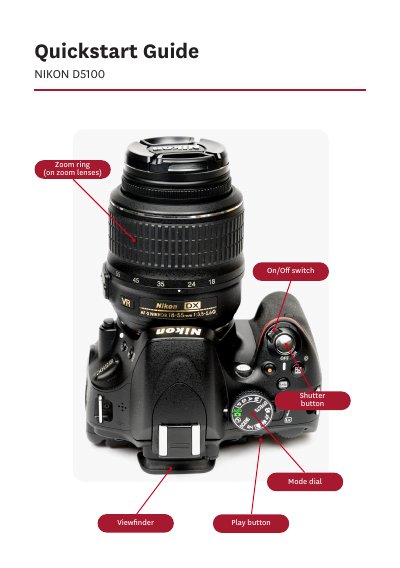
This quickstart guide explains basic Nikon D5100 operation: remove the lens cover, turn the power on, set the mode dial to auto, hold the camera with both hands, and look through the viewfinder. It then describes zooming with the zoom ring, focusing by lightly pressing the shutter button until a beep, taking a photo with a full press, and viewing photos with the play button.
The guide also gives tips on practicing half-press and full-press shutter operation, focusing off-center by half-pressing then reframing, and stabilizing shots in low light by tucking the elbows or using a tripod. Contact information is provided for more help.
Press the shutter button lightly; a beep indicates that the subject is in focus.
Press the play button.
Half-press the shutter button to focus, then move the camera to reframe before fully pressing to capture.
Angle your elbows toward your body and rest them on your chest, or use a tripod.