
Key facts
- Brand
- DELL
- Model
- T40
- Category
- Servers Computer
- Documents
- 4
- Languages
- ZH · KO · EN · ES
- Last added
- 2026-10-01
Start here
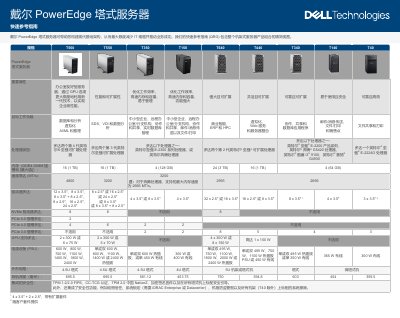
Dell PowerEdge Tower Servers T560, T550, T350, T150, T640, T440, T340, T140, T40 Quick Reference Guide
The Dell PowerEdge tower server Quick Reference Guide provides a concise view of the entire tower server portfolio, listing key specifications such as processor options, memory capacity, storage configurations, PCIe slots, GPU support, power supplies and physical dimensions. It also outlines target workloads ranging from databases and virtualization to AI/ML and small‑business applications.
Security is integrated throughout the server lifecycle, with TPM, FIPS, silicon root of trust, system lock, chassis intrusion alarm and optional secure erase. The guide highlights Dell OpenManage tools for centralized management, power monitoring and sustainable design features aimed at reducing carbon emissions and operating costs. This manual is written in Chinese.
Dell T40 specifications
| Supported processors | Up to two 4th‑gen Intel Xeon Scalable, 3rd‑gen Xeon, 2nd‑gen Xeon, Intel E‑2300, Pentium, Core i3, Celeron, Xeon E‑2224G |
|---|---|
| PCIe slots | Up to 2 × PCIe 5.0, 4 × PCIe 4.0, 2 × PCIe 3.0 |
| GPU support | Up to 2 × 300 W or 6 × 75 W GPUs |
All Dell T40 documents by type
The shortest path to a working setup, usually only a few pages.
Day-to-day operation, settings and troubleshooting. Start here if the product is already set up.
Questions answered in these manuals
What security features are integrated in PowerEdge tower servers?
They include TPM 1.2/2.0, FIPS/CC‑TCG certification, silicon root of trust, system lock, chassis intrusion alarm and optional secure erase.
Which management tools does Dell provide for these servers?
Dell OpenManage Enterprise and iDRAC enable centralized, automated management and power monitoring for the PowerEdge servers.
What is the maximum memory capacity?
The T640 supports up to 24 DDR4 DIMM slots and 3TB of memory.
From: Dell PowerEdge T640 T440 T340 T140 T40 Tower Servers Quick Reference Guide
What security features are standard on the tower servers?
TPM 1.2/2.0, digitally signed firmware, and secure boot are standard security features on all tower servers.
From: Dell PowerEdge T640 T440 T340 T140 T40 Tower Servers Quick Reference Guide
What should I do before setting up the system?
Follow the safety instructions included in the Safety, Environmental, and Regulatory Information document shipped with the system.
When should I install hardware or software?
Ensure that the operating system is installed before installing hardware or software not purchased with the system.