
Quick reference guide for Dell PowerEdge tower servers, covering specifications, workloads, processors, memory, storage, GPU, power and security features.
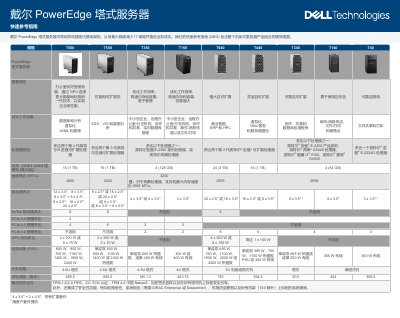
The Dell PowerEdge tower server Quick Reference Guide provides a concise view of the entire tower server portfolio, listing key specifications such as processor options, memory capacity, storage configurations, PCIe slots, GPU support, power supplies and physical dimensions. It also outlines target workloads ranging from databases and virtualization to AI/ML and small‑business applications.
Security is integrated throughout the server lifecycle, with TPM, FIPS, silicon root of trust, system lock, chassis intrusion alarm and optional secure erase. The guide highlights Dell OpenManage tools for centralized management, power monitoring and sustainable design features aimed at reducing carbon emissions and operating costs. This manual is written in Chinese.
| Supported processors | Up to two 4th‑gen Intel Xeon Scalable, 3rd‑gen Xeon, 2nd‑gen Xeon, Intel E‑2300, Pentium, Core i3, Celeron, Xeon E‑2224G |
|---|---|
| PCIe slots | Up to 2 × PCIe 5.0, 4 × PCIe 4.0, 2 × PCIe 3.0 |
| GPU support | Up to 2 × 300 W or 6 × 75 W GPUs |
They include TPM 1.2/2.0, FIPS/CC‑TCG certification, silicon root of trust, system lock, chassis intrusion alarm and optional secure erase.
Dell OpenManage Enterprise and iDRAC enable centralized, automated management and power monitoring for the PowerEdge servers.
Up to two NVMe drives are supported.