
Key facts
Start here
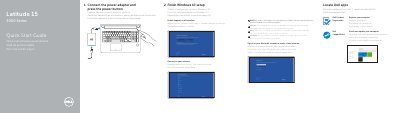
Dell Latitude 15 3000 Series Quick Start Guide
This quick start guide helps set up a Dell Latitude 15 3000 Series computer, with steps for connecting power, completing Windows 10 setup, enabling support and protection, connecting to a network, signing in, locating Dell apps, registering the computer, and running SupportAssist.
It also provides a numbered diagram identifying the computer's features, including camera, ports, touchpad, battery, and service tag, plus support, manual, and regulatory information. Text is provided in English, Polish, Romanian, and Slovenian.
Dell Latitude 15 3000 Series (Latitude 15-3570) specifications
| Computer model | Latitude 15-3570 |
|---|---|
| USB 3.0 connectors | 2 |
| Fingerprint reader | Optional |
| Power button | No LED indicator |
All Dell Latitude 15 3000 Series (Latitude 15-3570) documents by type
The shortest path to a working setup, usually only a few pages.
Questions answered in these manuals
How do I turn on the computer?
Connect the power adapter and press the power button.
How many USB 3.0 connectors does the laptop have?
It has two USB 3.0 connectors.
From: Dell Latitude 15 3000 Series (Latitude 15-3570) Quick Start Guide
Does the power button have an LED indicator?
No, the power button has no LED indicator.
From: Dell Latitude 15 3000 Series (Latitude 15-3570) Quick Start Guide
How do I connect to a secured wireless network?
Enter the password for the wireless network access when prompted.
From: Dell Latitude 15 3000 Series (Latitude 15-3570) Quick Start Guide
What should I do after connecting to the network?
Sign in to your Microsoft account or create a local account.
From: Dell Latitude 15 3000 Series (Latitude 15-3570) Quick Start Guide