
Dell Latitude 12 7000 Series 2-in-1 Quick Start Guide
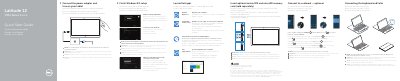
This guide helps you power on your Dell Latitude 12 7000 Series 2-in-1 tablet, complete Windows 8.1 setup, connect to a network, and sign in to your Microsoft account. It also covers inserting optional micro-SIM and microSD cards, connecting the keyboard and Folio, and locating key features like cameras, microphones, and ports. The guide includes safety and regulatory information, including compliance with Mexican NOM standards and ANATEL regulations.
| Battery | Rechargeable lithium-ion |
|---|---|
| Charger | PA-1300-04 |
| Regulatory Model | T02H |
| Regulatory Type | T02H001 |
| Computer Model | Latitude 12 7275 |
| Input Voltage | 120 V AC–240 V AC |
| Input Current | 1.30 A |
| Input Frequency | 50 Hz–60 Hz |
| Output Current | 1.5 A |
| Output Voltage | 20 V DC |
The regulatory model is T02H and the regulatory type is T02H001.
Insert the micro-SIM and microSD cards before powering on the tablet.
It turns on for 2 seconds.
The regulatory model is T02H.