
Key facts
Start here
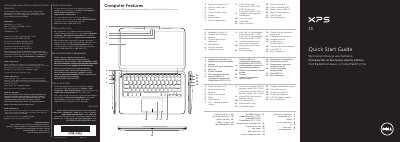
Dell P29G XPS L321X/L322X Laptop Quick Start Guide
This document provides Mexican NOM regulatory compliance details for the Dell P29G laptop, listing the importer, regulatory model number, and power adapter electrical specifications (100–240 VAC input, 19.5 VDC output). It also includes a multilingual quick start guide with diagrams identifying ports, buttons, and indicators on the XPS L321X and L322X models.
The quick start section illustrates connecting the power adapter, pressing the power button, completing Windows setup, checking wireless status, and using function keys for display, brightness, volume, and media control. It also shows where to locate the Service Tag and regulatory label for support. This manual is written in Spanish.
Dell L322x specifications
| Regulatory model | P29G |
|---|---|
| Type | P29G001/P29G002 |
| Computer model | XPS L321X/XPS L322X |
| Input voltage | 100–240 VAC |
| Input current (max) | 1.30 A |
| Input frequency | 50–60 Hz |
| Output current | 2.31 A |
| Output voltage | 19.50 VDC |
All Dell L322x documents by type
Disassembly, diagnostics and part numbers, for repair.
- Dell XPS 13 L321x/L322x Service Manual 74 p
- Dell XPS 13 L321x/L322x Service Manual 80 p
- Dell XPS 13 L321x/L322x Service Manual 80 p
- Dell XPS 13 L321x/L322x Laptop Service Manual 78 p
- Dell XPS 13 L321x/L322x Laptop Owner's Manual 74 p
- Dell XPS 13 L321x/L322x Service Manual 74 p
- Dell XPS 13 L321x/L322x Service Manual 74 p
- Dell XPS 13 L321x/L322x Service Manual 78 p
The shortest path to a working setup, usually only a few pages.
Day-to-day operation, settings and troubleshooting. Start here if the product is already set up.
Questions answered in these manuals
How do I discharge static electricity before working inside the computer?
Press and hold the power button for 5 seconds after unplugging the computer to discharge static electricity on the system board.
What must be done before reconnecting power after internal work?
All covers, panels, and screws must be installed.
What is the input voltage range for the Dell P29G power adapter?
The power adapter accepts 100–240 VAC input voltage.
Which laptop models correspond to regulatory model P29G?
Regulatory model P29G covers the XPS L321X and XPS L322X laptop models.
What is the model number of the Dell XPS 13 covered in this manual?
The manual covers models L321x and L322x.
Who is authorized to remove the computer cover?
Only a qualified service technician is authorized to remove the computer cover.