
User guide for Dell Dimension 5100, introduces the user to how to use the computer, including setting up a printer, connecting to the Internet and playing CDs and DVDs
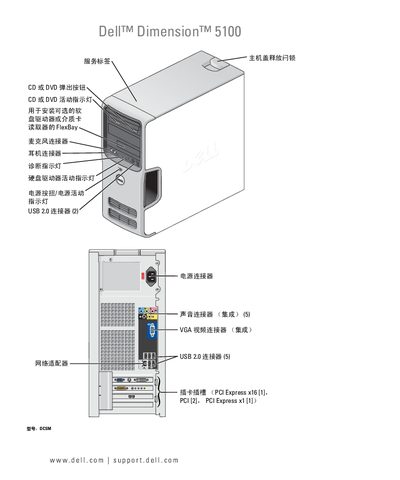
This manual covers the initial setup of the Dell Dimension 5100, including hardware installation, connecting peripherals such as printers, monitors, and network adapters, and configuring the operating system. Detailed sections explain how to use the CD/DVD drive, floppy drive, and optional media card reader, as well as how to adjust audio, video, and power settings.
Later chapters provide troubleshooting guidance for common issues with drives, audio, video, networking, and system stability. Diagnostic tools, driver management, and system restore procedures are also described to help maintain the computer’s performance. This manual is written in Chinese.
| USB ports | 2 USB 2.0 connectors |
|---|---|
| Memory type | DDR2 |
| Optical drive indicator | DVD activity LED |
The manual provides a procedure for clearing a forgotten password on page 110.
Battery replacement instructions are given on page 95.
The guide explains how to connect two VGA or a VGA and a DVI monitor on pages 19‑20.
Diagnostic indicator lights are described on page 41.