
Key facts
Start here
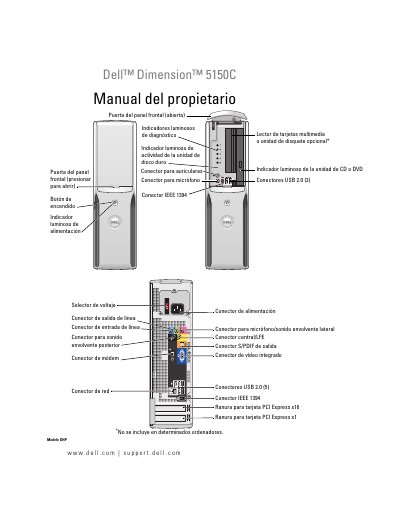
Dell Dimension 5150C Owner's Manual
This document is the Owner's Manual for the Dell Dimension 5150C desktop computer (Model DHP). It provides comprehensive instructions for setting up the system, connecting peripherals such as printers and monitors, and configuring the operating environment. The guide includes specific details on using the front panel ports, including USB 2.0, IEEE 1394, and audio connectors. This manual is written in Spanish.
Read onlineDell Dimension 5150C specifications
| Processor Type | Intel Pentium 4 5XXX and 6XXX processors, Pentium D 8XXX dual-core processors, or Intel Celeron D processors |
|---|---|
| Memory Type | 400 MHz and 533 MHz DDR2 unbuffered SDRAM |
| Maximum Memory | 4 GB |
| Height | 31.8 cm (12.5 inches) |
| Weight | 6.89 kg (15.2 lb) |
Source: Dell Dimension 5150C User Manual
All Dell Dimension 5150C documents by type
Day-to-day operation, settings and troubleshooting. Start here if the product is already set up.
Disassembly, diagnostics and part numbers, for repair.
Questions answered in these manuals
What is the maximum memory capacity for this computer?
The maximum memory capacity is 4 GB.
What tools are recommended before removing parts?
The manual suggests using the recommended tools listed in the 'Before You Begin' section.
What tools are recommended for servicing the Dell Dimension 5150C?
Recommended tools include a small flat-blade screwdriver, Phillips #0, #1, and #2 screwdrivers, and a Flash BIOS update program on a floppy disk or CD.
How should I ground myself before touching internal components?
Ground yourself by touching an unpainted metal surface, such as the metal at the back of the computer.
What is the model code for this Dell Dimension 5150C?
The model code is DHP.
Where can I find the Dell support website mentioned in the manual?
The manual directs users to support.dell.com for assistance.