
This document describes the features and characteristics of the Dell™ Dimension™ 5100C computer, including front panel flip cover, power button, hard drive indicator, etc.
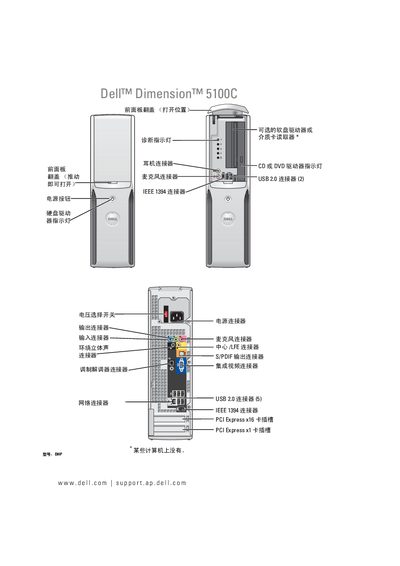
This manual covers the complete setup and operation of the Dell Dimension 5100C desktop, including hardware installation, connecting peripherals such as printers, USB devices, media card readers, and TVs, as well as configuring display settings and network connections. It also explains power‑management features, Windows installation, and multimedia functions like CD/DVD playback and disc copying.
Additional sections guide users through troubleshooting common issues, using Dell diagnostic tools, managing drivers, and performing hardware maintenance such as replacing hard drives, memory modules, and batteries. The document includes safety warnings, warranty information, and contact details for Dell support. This manual is written in Chinese.
The manual includes a section titled “更改显示设置” that explains how to adjust the display settings.
See the “使用介质卡读取器 (可选)” section for instructions on using the media card reader.
The Dell diagnostic program is described on page 42 under the heading “Dell 诊断程序”.
The manual provides a “更换电池” section that details the battery replacement procedure.