
Key facts
Start here
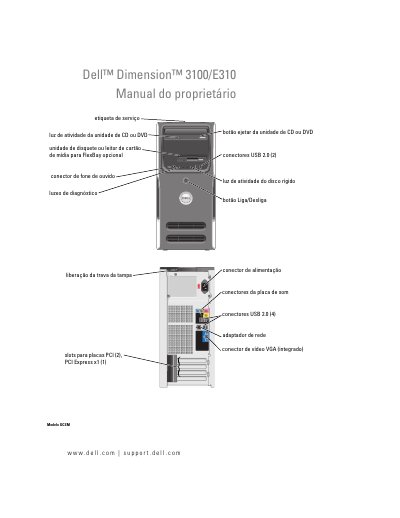
Dell Dimension 3100/E3100 Owner's Manual
This document is the Portuguese Owner's Manual for the Dell Dimension 3100 and E3100 desktop computers. It provides comprehensive instructions for setting up the computer, connecting peripherals such as printers and networks, and managing power options including sleep and hibernation modes. The guide also details how to use the included software tools for driver identification and system restoration. This manual is written in Portuguese.
Read onlineDell E3100 specifications
| Supported Memory Type | DDR2 |
|---|---|
| USB Ports | 2.0 (4) |
| PCI Slots | (2) |
| PCI Express Slots | x1 (1) |
All Dell E3100 documents by type
Day-to-day operation, settings and troubleshooting. Start here if the product is already set up.
Questions answered in these manuals
How do I identify the computer when contacting support?
Use the service label to identify the computer when visiting the support website or contacting technical support.
What is the Dell Diagnostics menu used for?
It is used for advanced troubleshooting and checking the system status.
What is the Dell Premier Support website for?
It is a customized web page for corporate, government, and educational clients to use in addition to the standard support site.
What type of memory does the computer support?
It uses 400 MHz and 533 MHz DDR2 unbuffered SDRAM in two memory connectors.
What is the maximum memory the computer supports?
The maximum memory is 2 GB, and the minimum is 256 MB.