
Key facts
- Brand
- DELL
- Model
- 5000 Series
- Category
- Other Electronics
- Documents
- 6
- Languages
- ZH · EN · FR
- Last added
- 2026-10-25
Start here
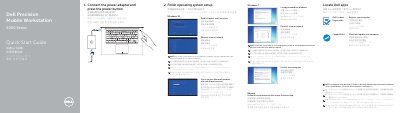
Dell Precision Mobile Workstation 5000 Series Quick Start Guide
This document serves as a multilingual quick start guide for the Dell Precision Mobile Workstation 5000 Series. It provides step-by-step instructions for initial setup, including connecting the power adapter, finishing operating system setup, connecting to a network, and protecting the computer. The guide covers setup for Windows 10, Windows 7, and Ubuntu.
Read onlineDell 5000 Series specifications
| Model Number | PN556W |
|---|---|
| Length | 145 mm (5.71 inches) |
| Diameter | 9.5 mm (0.37 inch) |
| Weight | 18 g (0.04 lb) |
| Wireless Technology | Bluetooth 4.0 |
| Wireless Range | 10 m (32.80 ft) |
| Supported Operating Systems | Windows 8.1, Windows 10 |
All Dell 5000 Series documents by type
Day-to-day operation, settings and troubleshooting. Start here if the product is already set up.
The shortest path to a working setup, usually only a few pages.
Disassembly, diagnostics and part numbers, for repair.
Questions answered in these manuals
What batteries does the Dell Active Pen use?
The pen uses one AAAA battery for the tip and buttons, and two coin-cell batteries for Bluetooth and top button functions.
Which devices are compatible with this pen?
It is designed to work only with selected Dell computers and tablets.
What security features are available on the Latitude 5000 Series?
The series features optional multi-factor authentication including a touch fingerprint reader, FIPS 201 Smart Card Reader, and Control Vault 2 FIPS 140-2 Level 3 certification.
From: Dell Latitude 5000 Series (5280/5480/5580) Product Leaflet
What operating systems are supported by the Latitude 5280?
The Latitude 5280 supports Microsoft Windows 10 Pro 64 bit, Microsoft Windows 10 Home 64 bit, Ubuntu 16.04 LTS 64-bit, and NeoKylin 6.0 64 bit.
From: Dell Latitude 5000 Series (5280/5480/5580) Product Leaflet
How do I install the AAAA battery?
Remove the top cap, insert the AAAA battery with the positive side inward, then replace the top cap.
How do I activate Bluetooth pairing mode?
Hold the top button for 3 seconds to activate pairing mode.