
Philips mobile phone user guide, introducing the operation methods and features of the phone.
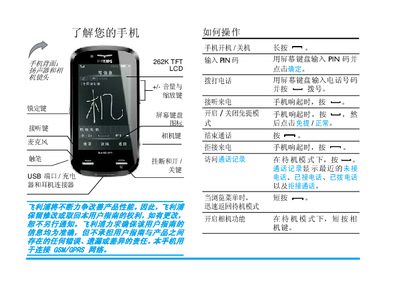
This manual provides step‑by‑step instructions for first‑time setup, such as inserting the SIM card, charging the battery, and configuring the touch screen. It also describes how to make and receive calls, use the camera, and navigate the phone’s menus.
Additional sections cover optional features like Bluetooth, micro‑SD storage, multimedia playback, and troubleshooting tips. Safety warnings, warranty information, and environmental compliance details are included at the end of the guide. This manual is written in Chinese.
| Screen type | 262K TFT LCD |
|---|---|
| Maximum talk time | 10 hours |
| Maximum standby time | 1 month |
| Supported micro‑SD capacity | up to 8 GB |
Turn off the phone, remove the back cover, align the cut‑corner of the SIM with the slot, and push it in until it stops.
The phone supports micro‑SD cards up to 8 GB.
From standby, tap the phone icon, enter the number on the screen keypad, then press the dial button.