
This is a summary of the Philips phone user manual, which introduces the phone's various functions and how to use them.
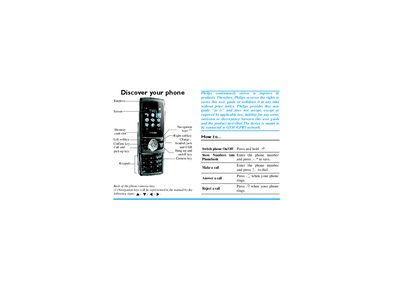
The guide walks you through getting started with the Philips CT0298 phone, including inserting the SIM and battery, charging via USB, and using the memory card slot. It explains how to switch the device on and off, make and receive calls, and access the phonebook and IP calling features.
Additional sections describe the phone’s multimedia functions, messaging options, tools such as alarm and calculator, contact management, and troubleshooting. The document ends with warranty terms and a declaration of conformity for the GSM 900/1800 radio module.
| Radio bands | GSM 900/1800 |
|---|---|
| Battery type | Rechargeable battery |
| Charging method | USB cable |
| Memory card slot | Supported |
| Headset jack | Present |
Press and hold the * key until the power‑on/off animation appears on the screen.
Connect the USB cable to the phone’s charging port and plug the other end into an AC socket.