
Philips mobile phone user guide, introducing the basic operations and functions of the phone, including inserting SIM card, power on/off, making calls, accessing contacts, etc.
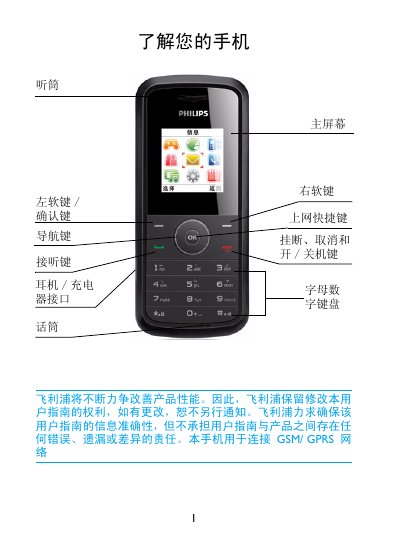
This guide introduces the Philips E102 mobile phone, describing its hardware layout, GSM/GPRS network support, and basic controls. It walks users through first‑time setup, SIM insertion, charging, and how to navigate the main menu.
The manual then details everyday functions such as making calls, managing contacts, sending SMS/MMS, using the web browser, adjusting display and sound settings, configuring security (PIN, lock), and accessing advanced features like IP dialing and call waiting. Warranty, SAR compliance, and environmental information are provided at the end. This manual is written in Chinese.
| Network Compatibility | GSM / GPRS |
|---|---|
| Maximum SAR (head) | 1.11 W/kg |
| SAR Limit (public) | 2.0 W/kg |
Press and hold the back cover, remove the battery, insert the SIM with the gold contacts facing down, then re‑install the battery and cover.
Open the L menu, go to Settings > Language, and select the desired language.
The Philips E102 phone has a maximum SAR of 1.11 W/kg.
Select L menu > Tools > Alarm, choose an alarm slot, set the time and repeat mode, then enable it.