
This is a short instruction manual that explains how to use a Panasonic rice cooker. It includes instructions on how to start cooking, change the flavor, cancel a program, and perform an automatic cleaning.
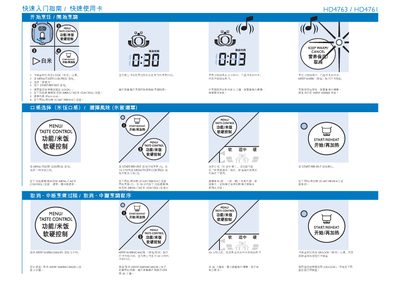
This guide explains how to begin cooking with the Philips HD4763/HD4761 rice cooker. Select the desired rice type using the MENU TASTE CONTROL, then press START/REHEAT to begin. The KEEP WARM/CANCEL button lets you stop cooking or keep the rice warm after the cycle ends.
The guide also describes the AUTO CLEAN function, which cleans the steam holes automatically. Press the AUTO CLEAN button, and the cooker will run the cleaning cycle and shut off when finished. Additional adjustments such as water level and cooking time can be set using the control panel. This manual is written in Chinese.
Press the AUTO CLEAN button; the cooker will clean the steam holes and shut off automatically when finished.