
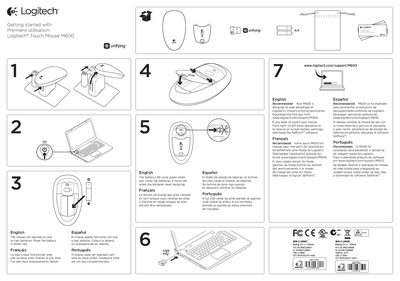
This guide explains how to get started with the Logitech M600 Touch Mouse. The mouse can operate on one or two AA batteries, and the battery LED turns green when installed and red when the batteries need replacing. It also describes how to download Logitech's smooth‑scrolling application and the SetPoint™ software for left‑hand/right‑hand switching and on‑screen battery warnings.
The manual covers touch‑gesture controls, Unifying technology that lets up to six compatible Logitech devices share a single receiver, and troubleshooting steps for common issues such as power switch position, receiver connection, and battery orientation.
| Battery type | AA (one or two) |
|---|---|
| Battery LED indicator | Green when installed, red when low |
| Unifying connectivity | Connects up to six compatible devices |
The M600 can operate with one or two AA batteries.
The battery LED turns red when the batteries need replacing.
The Unifying receiver can connect up to six compatible Logitech devices.
Download and install the SetPoint™ software to change hand operation.