
Key facts
Start here
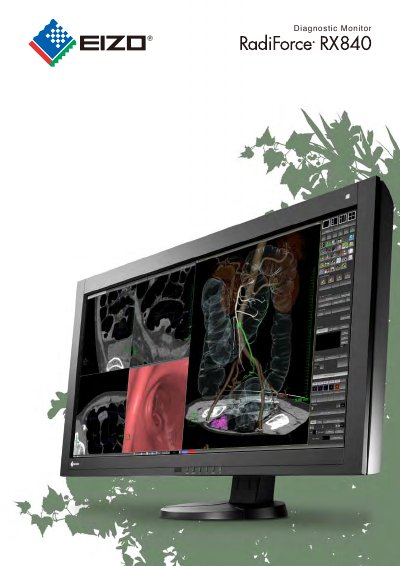
EIZO RadiForce RX840 Diagnostic Monitor Product Leaflet
EIZO RadiForce RX840 is a 36.4-inch diagnostic monitor that displays 8 megapixels at a native resolution of 4096 x 2160. It uses an LED backlight with a brightness warranty of 5 years or 25,000 hours at a recommended brightness of 400 cd/m2.
The monitor includes Hybrid Gamma, factory grayscale adjustment to the DICOM Part 14 standard, an integrated Front Sensor, an integrated presence sensor, Digital Uniformity Equalizer (DUE), and a CAL Switch with eight user-selectable modes. Its listed interfaces include DVI-D (dual link) x 2 and DisplayPort x 2, and supplied accessories include cables, an AC adapter, a utility disk, and a warranty card.
EIZO RX840 specifications
| Screen size | 36.4-inch (92 cm / 36.4" (923 mm diagonal)) |
|---|---|
| Panel type | Black TFT Color LCD Panel |
| Panel size | 92 cm / 36.4" (923 mm diagonal) |
| Display size (H x V) | 817.1 x 430.9 mm |
| Pixel pitch | 0.1995 x 0.1995 mm |
| Native resolution | 4096 x 2160 |
| Display colors | 10-bit colors (DisplayPort): 1.07 billion (maximum) colors; 8-bit colors: 16.77 million from a palette of 68 billion colors |
| Viewing angles (H, V) | 176°, 176° |
| Brightness (typical) | 700 cd/m2 |
| Recommended brightness for calibration | 400 cd/m2 |
| Response time (typical) | 25 ms (On/Off) |
| Scanning frequency (H, V) | 31 - 140 kHz, 29.5 - 30.5 Hz (2048 x 2160, 1920 x 2160), 59 - 61 Hz, (VGA Text: 69 - 71 Hz); Frame synchronous mode: 29.5 - 30.5 Hz, 59 - 61 Hz |
| Dot clock | DVI-D: 310 MHz, DisplayPort: 290 MHz |
| Input terminals | DVI-D (dual link) x 2, DisplayPort x 2 |
| USB ports / standard | 1 upstream, 2 downstream / Rev. 2.0 |
| Power requirements | AC 100 - 120 V, 200 - 240 V: 50 / 60 Hz |
| Power consumption / save mode | 350 W / Less than 6 W |
| Power management | DVI DMPM, DisplayPort 1.1a |
| Sensor | Backlight Sensor, Integrated Front Sensor, Presence Sensor, Ambient Light Sensor |
| OSD languages | English, French, German, Italian, Japanese, Simplified Chinese, Spanish, Swedish, Traditional Chinese |
| Net weight (with stand / without stand) | 30.9 kg (AC adapter included) / 23.2 kg |
| Hole spacing | VESA standard 200 x 200 mm |
| Certifications and standards | CE (Medical Device Directive), EN60601-1, UL60601-1, CSA C22.2 No. 601-1, IEC60601-1, VCCI-B, FCC-B, Canadian ICES-003-B, C-tick, RoHS, CCC, GOST-R |
| FDA 510(k) clearance | Pending (for General Radiography) |
| Supplied accessories | AC power cord, AC adapter, dual link signal cable (DVI-D ~ DVI-D) x 2, signal cable (DisplayPort ~ DisplayPort) x 2, USB cable, Utility Disk (RadiCS LE, ScreenManager Pro for Medical, user's manual), 4 screws for mount option, warranty card |
| Warranty | Five Years |
| Brightness warranty | 5 years or 25,000 hours at 400 cd/m2 |
Source: EIZO RadiForce RX840 Diagnostic Monitor Product Leaflet
All EIZO RX840 documents by type
Mounting, wiring and first power-up. Read it before the hardware goes in.
Questions answered in these manuals
What is the native resolution of the EIZO RadiForce RX840?
It displays 8 megapixels at a native resolution of 4096 x 2160.
From: EIZO RadiForce RX840 Diagnostic Monitor Product Leaflet
Does the RX840 meet the DICOM Part 14 standard?
Its grayscale tones are adjusted at the factory to meet the DICOM Part 14 standard.
From: EIZO RadiForce RX840 Diagnostic Monitor Product Leaflet
What power supply does the Eizo RadiForce RX840 require?
It is designed for 100-240 Vac, 50/60 Hz power.
From: Eizo RadiForce RX840 RX840-AR RX840-MG Color LCD Monitor Setup Manual
Which AC adapter should be used with the monitor?
Use the included PSA-064 AC adapter.
From: Eizo RadiForce RX840 RX840-AR RX840-MG Color LCD Monitor Setup Manual