
Key facts
- Manuals
- 133
- Models
- 49
- Categories
- 1
- Languages
- ZH · EN · JA
- Last added
- 2026-10-03
EIZO models by category
Featured EIZO manuals
EIZO LCD Monitor User Manual
This manual explains how to safely install and operate an EIZO 17‑inch LCD monitor. It covers basic functions such as connecting the display, using the touch‑screen, adjusting brightness, contrast, color temperature and other picture settings, as well as configuring power‑saving modes.
Additional sections describe cleaning recommendations, recommended accessories, detailed technical specifications, and warranty information. The document also includes a glossary of terms and an appendix with regulatory compliance details. This manual is written in Chinese.
Covers: Introduction · Features · Control and Functions · LCD Utility Disk · Basic Operation and Functions · Screen Adjustment
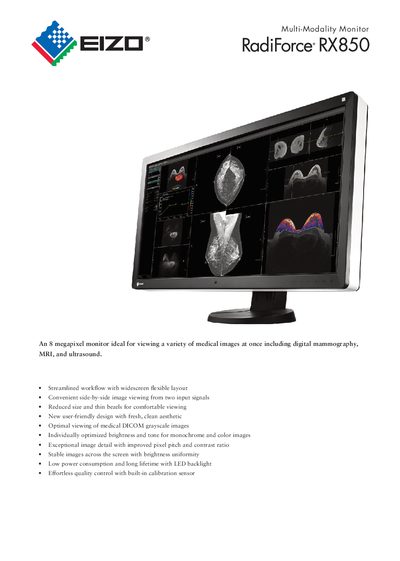
EIZO RadiForce M1721-8M2-31W Medical Monitor Datasheet
The RadiForce M1721-8M2-31W is a widescreen 8‑megapixel monitor designed for medical imaging such as digital mammography, MRI and ultrasound. It offers side‑by‑side viewing of two input signals, thin bezels for comfortable use, and a built‑in Integrated Front Sensor for automatic DICOM‑compliant calibration.
Key specifications include a 4096 × 2160 native resolution, 79 cm (31.1") diagonal display, 0.1704 mm pixel pitch, 500 cd/m² typical brightness, 1450:1 contrast ratio, and less than 17 W power consumption. The monitor meets numerous medical and safety certifications (CE, EN60601‑1, UL60601‑1, etc.) and is supplied with dual‑link DVI‑D and DisplayPort inputs.
Covers: Features & Functions · Specifications · Physical Specifications · Certifications & Standards · Dimensions · Warranty
EIZO FDF2304W-IP Color LCD Monitor Installation Guide
The EIZO FDF2304W-IP is a 23‑inch widescreen LCD monitor designed for displaying video from network cameras. It supports up to 16 cameras, offers split‑screen modes, and includes Smart Resolution, Smart Insight, and Noise Reduction features.
The manual covers product overview, system configuration, camera registration, on‑screen and web‑based settings, troubleshooting, reference pages, and a glossary. It also details safety precautions, network security recommendations, and warranty information. This manual is written in Chinese.
Covers: Product Overview · Features · System Configuration · Supported Network Cameras · Configuration via Monitor Screen · Web Browser Configuration
EIZO DuraVision FDX1001/FDV1001/FDX1201 Color LCD Monitor User Manual
This manual introduces the DuraVision FDX1001/FDV1001/FDX1201 Color LCD Monitor, covering safety symbols, precautions, and proper handling to prevent injury, fire, or equipment damage. It also details FCC and Canadian compliance, power requirements, and recommended usage environments.
The document includes detailed instructions for installation, power connection, and maintenance, as well as information on pixel quality, backlight lifespan, and cleaning procedures to ensure long‑term performance.
Covers: User’s Manual · FCC Declaration of Conformity · Safety Symbols · Precautions · Notice for this monitor
Latest EIZO manuals
EIZO LCD Monitor User Manual
User Manual 47 pages · 2.2 MB · ZHThe EIZO LCD monitor user manual provides safety guidelines, setup instructions, adjustment menus, energy‑saving features and troubleshooting tips.
EIZO RadiForce M1721-8M2-31W Medical Monitor Datasheet
Datasheet 2 pages · 353 KB · ENThe EIZO RadiForce M1721-8M2-31W is an 8‑megapixel medical monitor with high brightness, built‑in calibration sensor, and dual inputs for side‑by‑side imaging.
EIZO FDF2304W-IP Color LCD Monitor Installation Guide
Installation Guide 81 pages · 28.2 MB · ZHThis guide provides installation, configuration, and usage instructions for the EIZO FDF2304W-IP color LCD monitor used with network cameras.
EIZO color LCD user manual
This document is a product manual from EIZO NANAO CORPORATION, providing detailed information on how to use the product safely and effectively, including display installation and basic usage information. The manual includes product specifications and precautions, such as usage recommendations, cleaning instructions, and touch screen usage warnings.
EIZO FDX1001T/FDV1001T/FDX1201T display Manual(1)
Describes the features and functions of the DuraVision FDX1001T/FDV1001T/FDX1201T product.
EIZO FDX1001T/FDV1001T/FDX1201T display Manual(1)(1)
This document is the User's Manual for EIZO DuraVision FDX1001T/FDV1001T/FDX1201T
EIZO FDX1001/FDV100 display Manual
This user manual provides instructions for the safe and effective usage of the EIZO DuraVision FDX1001/FDV1001 monitor, as well as its compliance with FCC regulations.
EIZO FDX1501/FDX1501T display Manual
User's Manual, introduces safe and effective use of the product
EIZO FDX1001/FDV1001/FDX1201 display Manual
This user manual provides instructions for the safe and effective use of the EIZO DuraVision FDX1001/FDV1001/FDX1201 product. The product complies with FCC regulations and provides guidance on dealing with interference in radio and television reception.
EIZO DuraVision FDX1001/FDV1001/FDX1201 Color LCD Monitor User Manual
User Manual 32 pages · 2.5 MB · ENThe EIZO DuraVision FDX1001/FDV1001/FDX1201 monitor user manual provides safety guidelines, installation instructions, and specifications.
EIZO FX2431 Display User Manual
User Manual 57 pages · 7.3 MB · ZHThe EIZO FX2431 user manual provides setup, operation, adjustment, and troubleshooting instructions for the 24‑inch WUXGA monitor.
EIZO FX2431 Color LCD Monitor User Manual
User Manual 57 pages · 7.2 MB · ENThis manual provides setup, operation, cleaning, and troubleshooting instructions for the EIZO FX2431 color LCD monitor.
EIZO CG222W Color Monitor User Manual
User Manual 38 pages · 3.1 MB · ENThe EIZO CG222W user manual provides setup, operation, and maintenance instructions for this color‑accurate LCD monitor.
EIZO CG221 ColorEdge LCD User Manual
User Manual 46 pages · 2.2 MB · ZHThe EIZO CG221 ColorEdge LCD user manual provides safety instructions, setup, connection, screen management, adjustment, USB usage, troubleshooting, and…
EIZO ColorEdge CG221 User Manual
User Manual 46 pages · 2.2 MB · ZHThe EIZO ColorEdge CG221 user manual provides safety guidelines, setup instructions, and technical specifications for the color‑managed LCD monitor.
Which document do I need?
User Manual
Day-to-day operation, settings and troubleshooting. Start here if the product is already set up.
Datasheet
Ratings, dimensions and ordering codes, for selection and design work.
Installation Guide
Mounting, wiring and first power-up. Read it before the hardware goes in.
Questions answered in EIZO manuals
How should I clean the EIZO monitor?
Use a soft, slightly damp cloth or a recommended ScreenCleaner; avoid alcohol, solvents, abrasive cleaners, and never spray liquid directly onto the screen.
How can I adjust the brightness of the display?
Brightness can be adjusted manually via the menu or automatically with the Auto EcoView function, which senses ambient light and sets a comfortable level.
What is the maximum brightness of the monitor?
The monitor provides a typical brightness of 500 cd/m².
From: EIZO RadiForce M1721-8M2-31W Medical Monitor Datasheet
Does the monitor have a built‑in calibration sensor?
Yes, it includes an Integrated Front Sensor that measures brightness and grayscale tones for automatic DICOM Part 14 calibration.
From: EIZO RadiForce M1721-8M2-31W Medical Monitor Datasheet
How many network cameras can be displayed on the monitor?
The monitor can register and display up to 16 network cameras simultaneously.
What should be done after turning on the monitor before adjusting settings?
Wait at least 30 minutes after power‑on before adjusting the display to allow the electronics to stabilize.