
Key facts
- Brand
- DELL
- Model
- T350
- Category
- Servers Computer
- Documents
- 15
- Languages
- JA · ZH · EN · KO · ES · PT · RO · ID
- Last added
- 2026-11-11
Start here
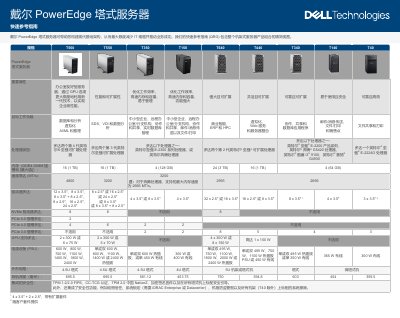
Dell PowerEdge Tower Servers T560, T550, T350, T150, T640, T440, T340, T140, T40 Quick Reference Guide
The Dell PowerEdge tower server Quick Reference Guide provides a concise view of the entire tower server portfolio, listing key specifications such as processor options, memory capacity, storage configurations, PCIe slots, GPU support, power supplies and physical dimensions. It also outlines target workloads ranging from databases and virtualization to AI/ML and small‑business applications.
Security is integrated throughout the server lifecycle, with TPM, FIPS, silicon root of trust, system lock, chassis intrusion alarm and optional secure erase. The guide highlights Dell OpenManage tools for centralized management, power monitoring and sustainable design features aimed at reducing carbon emissions and operating costs. This manual is written in Chinese.
Dell T350 specifications
| Processor | 1x Intel Xeon E-2300 series processor (up to 8 cores per processor) or 1x Intel Pentium processor (up to 2 cores per processor) |
|---|---|
| Memory | 4 DDR4 DIMM slots, UDIMM support, up to 3200 MT/s, maximum 128 GB |
| Storage controllers | Internal RAID: PERC H755, PERC H355, PERC H345, HBA355i, S150; external HBA (no RAID): HBA355e |
| Drive bays | Up to 4x 3.5-inch SAS/SATA (HDD/SSD) up to 80 TB, or up to 8x 3.5-inch SAS/SATA (HDD/SSD) up to 160 TB |
| Power supply | Non-hot-plug single 450W Bronze AC/100-240V, or hot-plug redundant 600W Platinum AC/100-240V |
| Dimensions | Height 382.5 mm, width 175 mm, depth 581.12 mm (with bezel) |
| Mass | 4x3.5-inch chassis: 19.54 kg; 8x3.5-inch chassis: 25.34 kg |
| Embedded NIC | 2x 1 GbE LOM |
| PCIe slots | 4 PCIe slots: 1x16 Gen4, 1x4 Gen4, 1x4 Gen3, 1x1 Gen3 |
| Embedded management | iDRAC9, iDRAC Direct, iDRAC RESTful API with Redfish, iDRAC Service Module |
All Dell T350 documents by type
The shortest path to a working setup, usually only a few pages.
Disassembly, diagnostics and part numbers, for repair.
- Dell Precision T3500 Service Manual 105 p
- Dell Precision T3500/T5500 Hard Drive Tray Replacement Guide 4 p
- Dell Precision T3500/T5500 Hard Drive Tray Replacement Instructions 4 p
- Dell Precision T3500/T5500 Workstation Hard Drive Tray Replacement Guide 4 p
- Dell Precision T3500 Service Manual 80 p
- Dell Precision T3500 Service Manual 63 p
- Dell Precision T3500/T5500 Hard Drive Tray Replacement Guide 4 p
- Dell Precision T3500 Service Manual 79 p
- Dell Precision T3500 Workstation Service Manual 79 p
- Dell Precision T3500 Workstation Service Manual 79 p
Day-to-day operation, settings and troubleshooting. Start here if the product is already set up.
Questions answered in these manuals
Which processors does the PowerEdge T350 support?
It supports one Intel Xeon E-2300 series processor with up to 8 cores per processor, or one Intel Pentium processor with up to 2 cores per processor.
What is the maximum memory of the PowerEdge T350?
It has four DDR4 DIMM slots that support UDIMMs at up to 3200 MT/s, with a maximum of 128 GB.
What security features are integrated in PowerEdge tower servers?
They include TPM 1.2/2.0, FIPS/CC‑TCG certification, silicon root of trust, system lock, chassis intrusion alarm and optional secure erase.
Which management tools does Dell provide for these servers?
Dell OpenManage Enterprise and iDRAC enable centralized, automated management and power monitoring for the PowerEdge servers.
How do I remove the hard drive tray?
First remove the computer cover, then push the blue release tab toward the bottom, lift the tray upward on its hinges, and finally remove the three securing screws.
How can I start Dell Diagnostics on the T3500?
Power on the computer, and when the Dell logo appears, press F12 immediately to access the boot device list, then select the Diagnostics utility.