
Dell EMC PowerEdge tower servers are designed for small and home offices, remote offices, and data centers. They offer powerful performance, versatility, and quiet operation. Tower servers are available in a variety of sizes, from mini towers to rack-supported platforms, and have flexible expansion options to adapt to changing workloads.
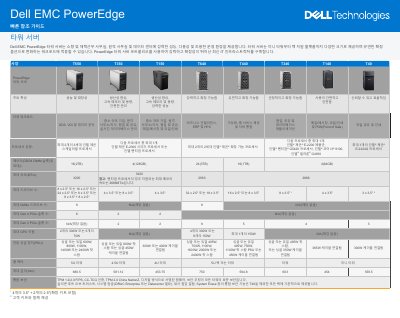
This document serves as a quick reference guide for the Dell EMC PowerEdge Tower Server portfolio, which includes models T550, T350, T150, T640, T440, T340, T140, and T40. These servers are designed to provide powerful performance, versatility, and a quiet operating environment for small to remote offices, branch offices, and data centers. The portfolio offers flexible form factors ranging from mini towers to rack support platforms, allowing for adaptable expansion options to meet changing workload requirements. This manual is written in Korean.
| Form Factor | 5U Tower, 4.5U Tower, 4U Tower, 5U Rack or Tower, Mini Tower |
|---|---|
| Maximum Memory | Up to 2TB (24 DIMM slots) |
| Maximum Drive Count | Up to 32 x 2.5" or 18 x 3.5" |
| Power Supply | Single or Dual 600W, 800W, 1100W, 1400W or 2400W |
| Integrated Security | TPM 1.2/2.0, FIPS, CC-TCG certification |
They are designed for SDS, VDI, data analytics, small to medium businesses, and remote offices.
The maximum memory capacity is up to 2TB using DDR4 DIMM slots.