
Key facts
Start here
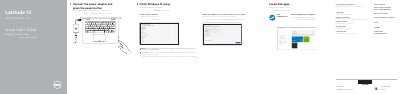
Dell Latitude 3379 Quick Start Guide
This guide helps you set up your Dell Latitude 3379 2-in-1 laptop. Connect the power adapter, locate Dell apps, and complete Windows 10 setup. Connect to your network, sign in to your Microsoft account, and access support resources. The device features a touchpad, USB ports, HDMI, and a service tag label for identification.
The guide also lists hardware features including microphone, infrared camera, camera status light, volume controls, and power button. It covers modes such as Notebook, Tablet, Tent, and Stand, helping you adapt the device to different usage scenarios.
Dell Latitude 3379 specifications
| Computer Model | Latitude 3379 |
|---|---|
| Regulatory Model | P69G |
| Regulatory Type | P69G001 |
Source: Dell Latitude 3379 2-in-1 Notebook Quick Start Guide
All Dell Latitude 3379 documents by type
Day-to-day operation, settings and troubleshooting. Start here if the product is already set up.
The shortest path to a working setup, usually only a few pages.
Disassembly, diagnostics and part numbers, for repair.
Questions answered in these manuals
What should I do if I am connecting to a secured wireless network?
Enter the password for the wireless network access when prompted.
Where can I find product support and manuals?
Visit Dell.com/support or Dell.com/support/manuals.
What safety step is required before opening the computer's covers or panels?
Disconnect all power sources before opening the cover or panels.
Who should perform many repairs?
Many repairs must be performed only by an authorized service technician.
What safety precautions must be taken before working inside the Dell Latitude 3379?
You must disconnect all power sources, turn off the computer, and ground yourself by touching an unpainted metal surface to avoid electrostatic discharge.
What type of memory does the Dell Latitude 3379 support?
The laptop supports DDR4 memory at speeds of 2133 MHz, with a minimum capacity of 4 GB and a maximum of 16 GB (2 x 8 GB).