
Key facts
Start here
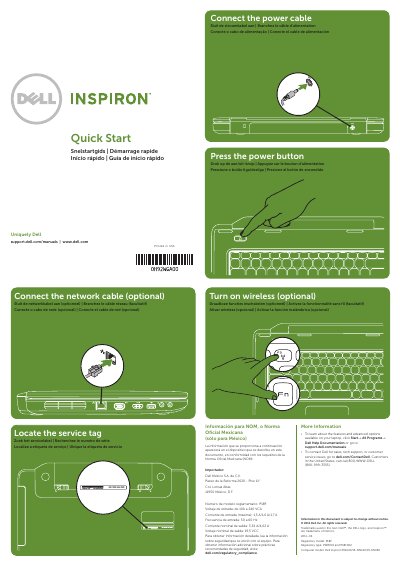
Dell Inspiron M5040/15-N5040/15-N5050 Quick Start Guide
This document serves as a quick start guide for Dell Inspiron laptops, specifically models M5040, 15-N5040, and 15-N5050. It provides multilingual instructions for initial setup steps, including connecting network and power cables, locating the service tag, and turning on the device.
Read onlineDell Inspiron M5040 specifications
| Input Voltage | 100 to 240 VCA |
|---|---|
| Input Frequency | 50 to 60 Hz |
| Output Voltage | 19.5 VCC |
Source: Dell Inspiron M5040/15-N5040/15-N5050 Quick Start Guide
All Dell Inspiron M5040 documents by type
The shortest path to a working setup, usually only a few pages.
Disassembly, diagnostics and part numbers, for repair.
Day-to-day operation, settings and troubleshooting. Start here if the product is already set up.
Questions answered in these manuals
Where can I find more information about features and advanced options?
Click Start→ All Programs→ Dell Help Documentation or go to support.dell.com/manuals.
From: Dell Inspiron M5040/15-N5040/15-N5050 Quick Start Guide
How do I contact Dell for support?
Visit dell.com/ContactDell or call 800-WWW-DELL (800-999-3355) for customers in the United States.
From: Dell Inspiron M5040/15-N5040/15-N5050 Quick Start Guide
What tools are required for the procedures in this manual?
The procedures require a small flathead screwdriver, a Phillips screwdriver, a plastic point, and the BIOS update executable program.
Where can I download the BIOS update for my computer?
You can download the BIOS update from the Dell support website at support.dell.com/support/downloads.
What tools are recommended for the procedures?
A small flat-blade screwdriver, a Phillips screwdriver, a plastic scribe, and the executable BIOS update program available at support.dell.com.
How should the computer be shut down before service?
Save and close all open files, exit all programs, and shut down the computer; if it does not shut down automatically, hold the power button until it turns off.