
Key facts
Start here
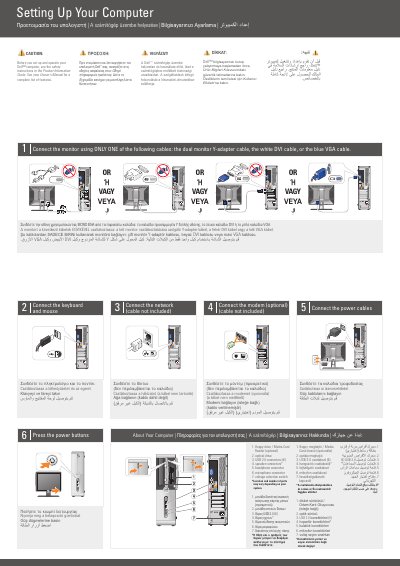
Dell Inspiron 530s/531s Setting Up Your Computer
This document is a setup guide for the Dell Inspiron 530s/531s desktop computer. It shows how to connect the monitor, keyboard, mouse, network, optional modem, and power cables, then press the power buttons.
It also describes the front-panel connectors and ports, optional wireless network setup, and where to find more information in the Owner's Manual or at support.dell.com.
Dell Inspiron 530s specifications
| USB 2.0 connectors | 6 |
|---|---|
| Floppy drive / Media Card Reader | Optional |
| Voltage selection switch | Included |
All Dell Inspiron 530s documents by type
The shortest path to a working setup, usually only a few pages.
Day-to-day operation, settings and troubleshooting. Start here if the product is already set up.
- Dell Inspiron 530s/531s Computer Setting Up Your Computer Guide 2 p
- Dell Inspiron 530s User's Guide 218 p
- Dell Inspiron 530s Series Owner's Manual 250 p
- Dell Inspiron 530 Series Owner's Manual 226 p
- Dell Inspiron 530s Series Desktop Computer Owner's Manual 222 p
- Dell Inspiron 530 Series Computer Owner's Manual 250 p
- Dell Inspiron 530s DCSL User Manual 218 p
- Dell Inspiron 530 Series User Manual 210 p
Questions answered in these manuals
How many monitor cables should be used?
Connect the monitor using only one of the listed cables.
Is the network cable included?
No, the network cable is not included.
Which cable should be used to connect the monitor?
Use only one of the following cables: the dual monitor Y-adapter cable, the white DVI cable, or the blue VGA cable.
From: Dell Inspiron 530s/531s Setting Up Your Computer Guide
Is a network cable included with the computer?
No. The network connection step states that the cable is not included.
From: Dell Inspiron 530s/531s Setting Up Your Computer Guide
Which cables can be used to connect the monitor?
The monitor can be connected using a dual monitor Y-adapter cable, a white DVI cable, or a blue VGA cable.
From: Dell Inspiron 530s/531s Computer Setting Up Your Computer Guide
Where can I find more information if I don't have a printed manual?
Users can visit support.dell.com for more information about using the computer.
From: Dell Inspiron 530s/531s Computer Setting Up Your Computer Guide