
SPLC780A1 is a dot-matrix LCD controller and driver that can display alpha-numeric, Japanese-Kana characters and symbols. It provides two types of interfaces to MPU: 4-bit and 8-bit interfaces. The transferring speed of 8-bit is twice faster than 4-bit. A single SPLC780A1 is able to display up to two 8-character lines. It has CMOS technology, ensuring power efficiency and high performance.
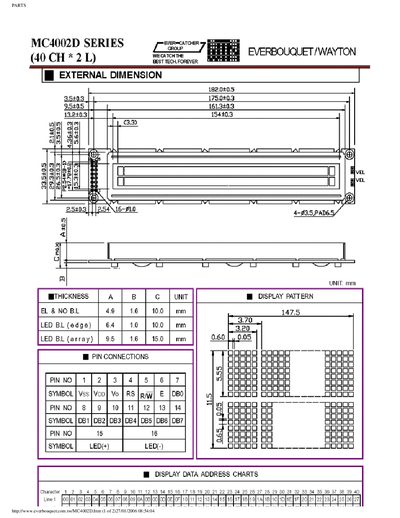
The handbook provides a parts list for the Everbouquet MC4002D series display modules and detailed technical information about the SUNPLUS SPLC780A1 LCD controller used in the product. It includes dimensions, pin connections, and functional descriptions.
The document also contains a general description of the SPLC780A1, its character generator ROM/RAM sizes, supported interfaces (4‑bit and 8‑bit), display capabilities, and package information, followed by a disclaimer from Sunplus Technology.
| Character generator ROM size | 7200 bits |
|---|---|
| Character generator RAM size | 512 bits |
| Character font 5×7 capacity | 160 characters |
| Character font 5×10 capacity | 32 characters |
| Supported interfaces | 4‑bit and 8‑bit MPU interfaces |
| Maximum display lines | Two 8‑character lines |
It can display up to two lines of eight characters each.
The controller provides both 4‑bit and 8‑bit interfaces to the MPU.
The ROM contains 7200 bits.