
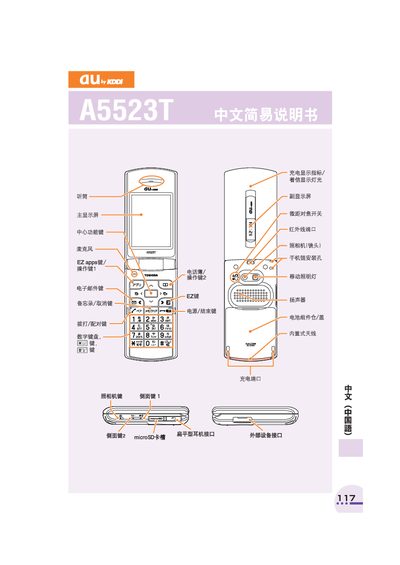
au A5523T User Manual

None


au A5523T User Manual - cover page
Brand
au by KDDI
Category
Other
Document type
User Manual
Language
Chinese
Pages
3
File format
PDF
File size
731 KB
Published
27 March, 2012
Updated
01 October, 2023
MD5 checksum
C18D8F08B39B4B1844EF076E97D91970

About this manual

This manual provides operating instructions for the au A5523T mobile phone. It includes guidance on making calls, managing contacts, using the camera function, and adjusting settings such as silent mode and call forwarding. This manual is written in Chinese.

What's inside

  • Basic operations
  • Contacts
  • Camera
  • Settings
  • Troubleshooting

Frequently asked questions

How do I make an international call to the United States?

Enter the country code for the United States, then enter the phone number and press the call key.

How do I record a video?

Press and hold the camera key for more than one second on the standby screen, then press the record key to start recording.

Download PDF (731 KB)

More au by KDDI Manuals


View all au by KDDI manuals →