
au by KDDI GzOne W42CA Phone User Manual

G'zOne W42CA (CN661C005345)
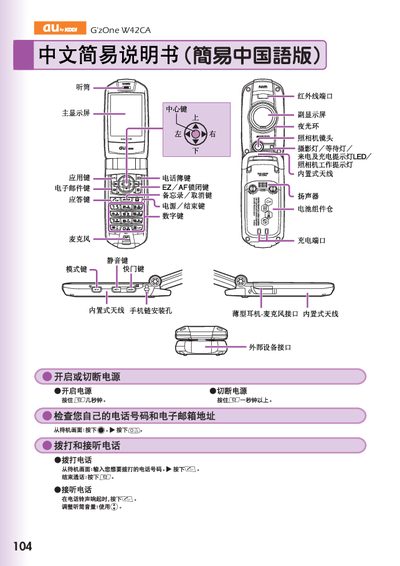

au by KDDI GzOne W42CA Phone User Manual - cover page
Brand
au by KDDI
Category
Cell Phones
Document type
User Manual
Language
Chinese
Pages
2
File format
PDF
File size
921 KB
Published
27 March, 2012
Updated
01 October, 2023
MD5 checksum
A380BEAD49091513119177FD23F888EF

About this manual

The manual provides step‑by‑step instructions for powering the phone, making and receiving calls, managing the phonebook, and using the built‑in camera for both snapshots and animation. It also describes how to adjust volume, mute the device, and access voicemail.

Additional sections cover international dialing, English voicemail prompts, voice recording, and other phone functions. Contact information for au customer service is included for further assistance. This manual is written in Chinese.

What's inside

  • External Device Interface
  • Saving and Viewing Phonebook Data
  • Using Camera (Animation and Snapshot)
  • Making International Calls
  • English Voicemail Reply
  • Other Phone Functions
  • Voice Recording
  • Customer Service Contact

Frequently asked questions

How do I make a phone call?

From the standby screen, enter the phone number and press the call button.

How do I take a photo with the camera?

From the standby screen, hold the camera key for more than one second, then press the shutter button to capture a snapshot.

Download PDF (921 KB)

More au by KDDI Manuals


View all au by KDDI manuals →