
KDDI W31CA User Manual

This document is the user manual for W31CA mobile phone
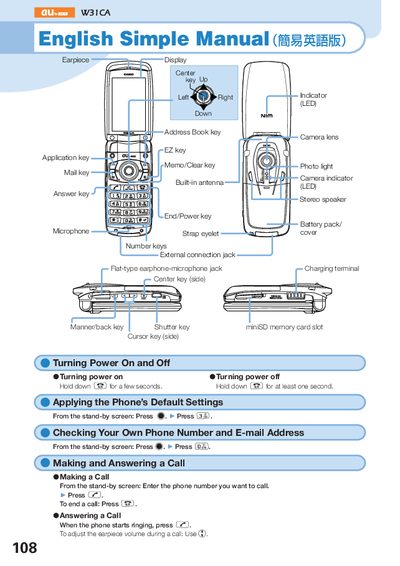

KDDI W31CA User Manual - cover page
Brand
au by KDDI
Category
Other
Document type
User Manual
Language
English
Pages
2
File format
PDF
File size
428 KB
Published
27 March, 2012
Updated
30 September, 2023
MD5 checksum
19F9B674C8BFEFBBAA0AE8F54312F932

About this manual

This manual provides step‑by‑step instructions for operating the KDDI W31CA phone. It explains how to turn the device on and off, apply default settings, check your own phone number and e‑mail address, and make or answer calls.

Additional sections cover storing and recalling address‑book data, using the built‑in camera for movies and snapshots, making international calls, configuring English voice‑mail prompts, and other handy features such as Manner mode and the Take‑A‑Message voice recording function.

What's inside

  • Power On and Off
  • Applying Default Settings
  • Checking Phone Number and E‑mail Address
  • Making and Answering a Call
  • Storing and Recalling Address Book Data
  • Using the Camera (Movie and Snapshot)
  • Making an International Call
  • English Voice Mail Answering Messages
  • Other Handy Features

Frequently asked questions

How do I turn the phone on?

Hold down the power key for a few seconds.

How do I turn the phone off?

Hold down the power key for at least one second.

How do I make an international call?

Enter the area code, international access code, country code, then the destination number.

How do I take a snapshot with the camera?

From the stand‑by screen, hold down the shutter key for at least one second, then press the shutter key to capture the photo.

Download PDF (428 KB)

More au by KDDI Manuals


View all au by KDDI manuals →